HC-SR501 pIR motion sensor with Arduino Uno
How to connect an HC-SR501 pIR motion sensor to an Arduino Uno: the wiring, a sketch that works, and a simulator to try it in your browser before you build it.
HC-SR501 passive infrared motion sensor · 4.5–20 V · output 3.3 V HIGH for 3 s after movement (re-triggers) · up to 7 m, 110° cone · needs about a minute to settle after power-up (shortened here)
Wiring
| HC-SR501 pIR motion sensor pin | Arduino Uno |
|---|---|
| VCC | 5V |
| OUT | D2 (INT0) |
| GND | GND |
An HC-SR501 needs about a minute to settle after power-up and holds its output HIGH for a few seconds after movement (set with its trimmer).
Run it in the labFree, no account needed. The same wiring, with the sketch already on the board.
Code
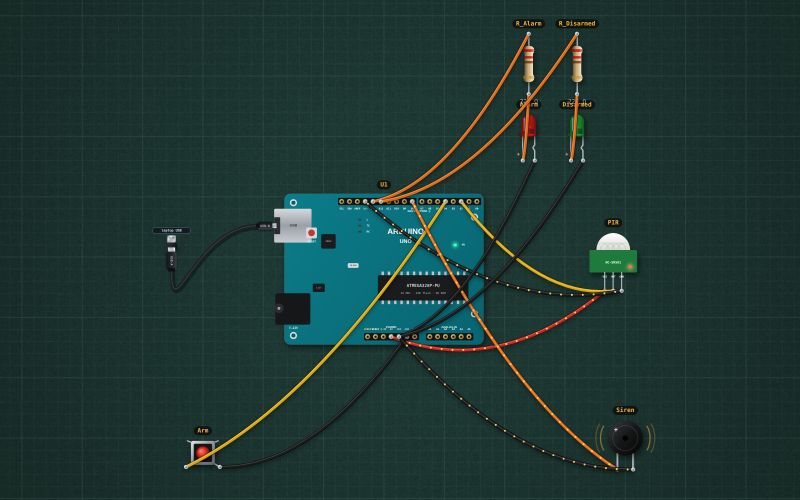
From the project Arduino motion alarm: PIR sensor, siren and arm button. It also compiles in the Arduino IDE with the libraries it includes.
// Motion alarm: a PIR sensor on D2. Press the button (D4) to arm it: 5 s later it watches.
// Movement: the siren (active buzzer, D8) and the red LED (D13) for 10 s. Press again to disarm. Green LED D12: disarmed.
const int PIR = 2, BTN = 4, SIREN = 8, RED = 13, GREEN = 12;
bool armed = false;
unsigned long armedAt = 0, alarmAt = 0;
int lastBtn = HIGH;

void setup() {
  Serial.begin(9600);
  pinMode(PIR, INPUT); pinMode(BTN, INPUT_PULLUP);
  pinMode(SIREN, OUTPUT); pinMode(RED, OUTPUT); pinMode(GREEN, OUTPUT);
  delay(50);                              // let the pull-up settle before the first read
  lastBtn = digitalRead(BTN);
  digitalWrite(GREEN, HIGH);
  Serial.println("Disarmed");
}

void loop() {
  unsigned long now = millis();
  int b = digitalRead(BTN);
  if (b == LOW && lastBtn == HIGH) {                 // a press
    armed = !armed; armedAt = now; alarmAt = 0;
    digitalWrite(SIREN, LOW); digitalWrite(RED, LOW); digitalWrite(GREEN, armed ? LOW : HIGH);
    Serial.println(armed ? "Armed: leave within 5 s" : "Disarmed");
    delay(30);
  }
  lastBtn = b;
  if (armed && now - armedAt > 5000 && alarmAt == 0 && digitalRead(PIR) == HIGH) {
    alarmAt = now; Serial.println("Movement! Alarm");
  }
  bool sounding = alarmAt != 0 && now - alarmAt < 10000;
  if (alarmAt != 0 && !sounding) alarmAt = 0;        // quiet again, still armed
  digitalWrite(SIREN, sounding ? HIGH : LOW);
  digitalWrite(RED, sounding && (now / 250) % 2 ? HIGH : LOW);
}
For teachers
The project runs in the browser on a laptop or a phone, so every student can build and test it before the class touches a real board. Assign it on the teacher's page and set what counts as done: a prediction, a hidden fault found, or a passing test sheet.