Photoresistor with Arduino Uno
How to connect a Photoresistor to an Arduino Uno: the wiring, a sketch that works, and a simulator to try it in your browser before you build it.
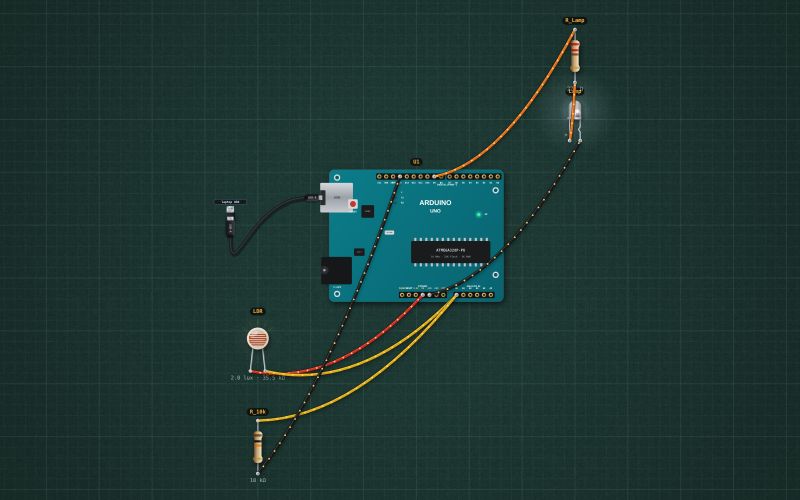
GL5528 CdS light-dependent resistor · 14 kΩ at 10 lux · 1 MΩ dark · γ 0.6 · 100 mW
Wiring
| Photoresistor pin | Arduino Uno |
|---|---|
| Lead 1 | 5V |
| Lead 2 | A0 |
Run it in the labFree, no account needed. The same wiring, with the sketch already on the board.
Code
From the project Arduino automatic night light: LDR and a PWM LED. It also compiles in the Arduino IDE with the libraries it includes.
// Automatic night light: an LDR and a 10 kΩ resistor make a divider on A0 (bright = high reading).
// The darker it gets, the brighter the LED on D9 (PWM). Fully on below about 5 lux, off in daylight.
const int LDR = A0, LAMP = 9;
const int DARK = 150, BRIGHT = 700;      // readings at night and in a lit room
unsigned long shownAt = 0;

void setup() {
  Serial.begin(9600);
  pinMode(LAMP, OUTPUT);
}

void loop() {
  int light = analogRead(LDR);
  int duty = map(constrain(light, DARK, BRIGHT), DARK, BRIGHT, 255, 0);
  analogWrite(LAMP, duty);
  if (millis() - shownAt >= 1000) { shownAt = millis(); Serial.print("Light "); Serial.print(light); Serial.print("  lamp "); Serial.print(duty * 100 / 255); Serial.println(" %"); }
  delay(20);
}
For teachers
The project runs in the browser on a laptop or a phone, so every student can build and test it before the class touches a real board. Assign it on the teacher's page and set what counts as done: a prediction, a hidden fault found, or a passing test sheet.