Relay module with Arduino Uno
How to connect a Relay module to an Arduino Uno: the wiring, a sketch that works, and a simulator to try it in your browser before you build it.
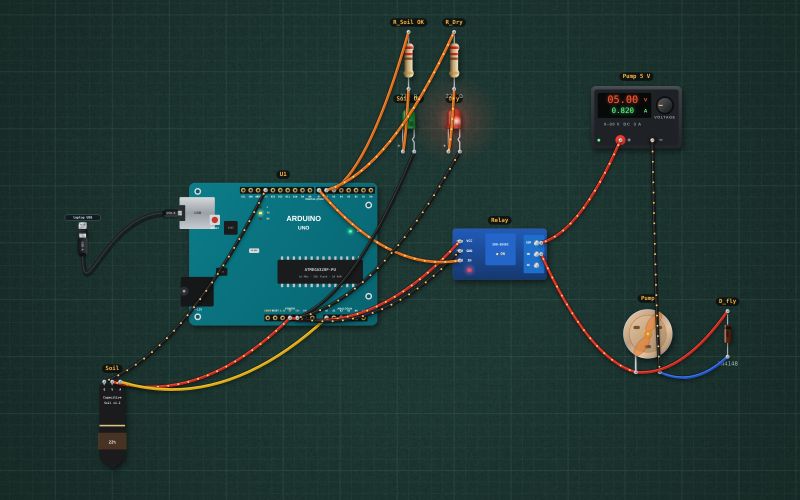
1-channel relay board · 5 V coil (SRD-5VDC) with transistor, flyback diode and indicator LED · input active LOW (pull IN to GND to switch on) · contacts 10 A 250 V AC / 30 V DC: COM, NO, NC
Wiring
| Relay module pin | Arduino Uno |
|---|---|
| VCC | 5V |
| GND | GND |
| IN | D7 |
| COM | + of the 5 V supply |
Most relay modules switch on when IN is LOW. Write the pin HIGH before making it an output, so the relay does not click on at power-up. Put a diode across a DC motor or pump.
Run it in the labFree, no account needed. The same wiring, with the sketch already on the board.
Code
From the project Arduino automatic plant watering: soil sensor, relay and pump. It also compiles in the Arduino IDE with the libraries it includes.
// Automatic plant watering: a capacitive soil sensor on A0 and a relay module that runs a 5 V pump.
// Below 35 % moisture the pump runs in 3 s bursts with 10 s pauses, so the water soaks in before the next reading.
// Green LED D5: soil OK. Red LED D6: dry. The relay module (IN on D7) switches on when IN is LOW.
const int SOIL = A0, RELAY = 7, OK_LED = 5, DRY_LED = 6;
const int DRY_RAW = 593, WET_RAW = 266;   // about 2.9 V in dry air and 1.3 V in water, on the 5 V reference
bool pumping = false;
unsigned long pumpAt = 0, restAt = 0, shownAt = 0;

int moisture() {
  int raw = analogRead(SOIL);
  return constrain(map(raw, DRY_RAW, WET_RAW, 0, 100), 0, 100);
}

void setup() {
  Serial.begin(9600);
  digitalWrite(RELAY, HIGH);              // pump off before the pin becomes an output
  pinMode(RELAY, OUTPUT);
  pinMode(OK_LED, OUTPUT); pinMode(DRY_LED, OUTPUT);
}

void loop() {
  unsigned long now = millis();
  int m = moisture();
  bool dry = m < 35;
  digitalWrite(OK_LED, dry ? LOW : HIGH);
  digitalWrite(DRY_LED, dry ? HIGH : LOW);
  if (pumping && now - pumpAt >= 3000) { pumping = false; restAt = now; digitalWrite(RELAY, HIGH); Serial.println("Pump off, soaking"); }
  if (!pumping && dry && (restAt == 0 || now - restAt >= 10000)) { pumping = true; pumpAt = now; digitalWrite(RELAY, LOW); Serial.println("Pump on"); }
  if (now - shownAt >= 1000) { shownAt = now; Serial.print("Moisture "); Serial.print(m); Serial.println(" %"); }
}
For teachers
The project runs in the browser on a laptop or a phone, so every student can build and test it before the class touches a real board. Assign it on the teacher's page and set what counts as done: a prediction, a hidden fault found, or a passing test sheet.