What keeps the Wi-Fi router up in a brownout?
A DC UPS: a 12 V battery with a charger and a switch that feeds the router without an inverter. A router draws 5–12 W, so a 12 V 7 Ah battery gives 6–12 hours and a 20 Ah LiFePO4 gives a day. A mains UPS for computers lasts minutes on the same load because its inverter wastes most of the battery.
Paano mananatiling may Wi-Fi pag brownout?
DC UPS: 12 V na battery na may charger at switch na direktang nagpapakain sa router, walang inverter. Ang router ay kumukuha ng 5 hanggang 12 W, kaya ang 12 V 7 Ah ay tatagal ng anim hanggang labindalawang oras at ang 20 Ah LiFePO4 ay isang araw. Ang mains UPS para sa computer ay minuto lang tatagal sa parehong load.
See it run
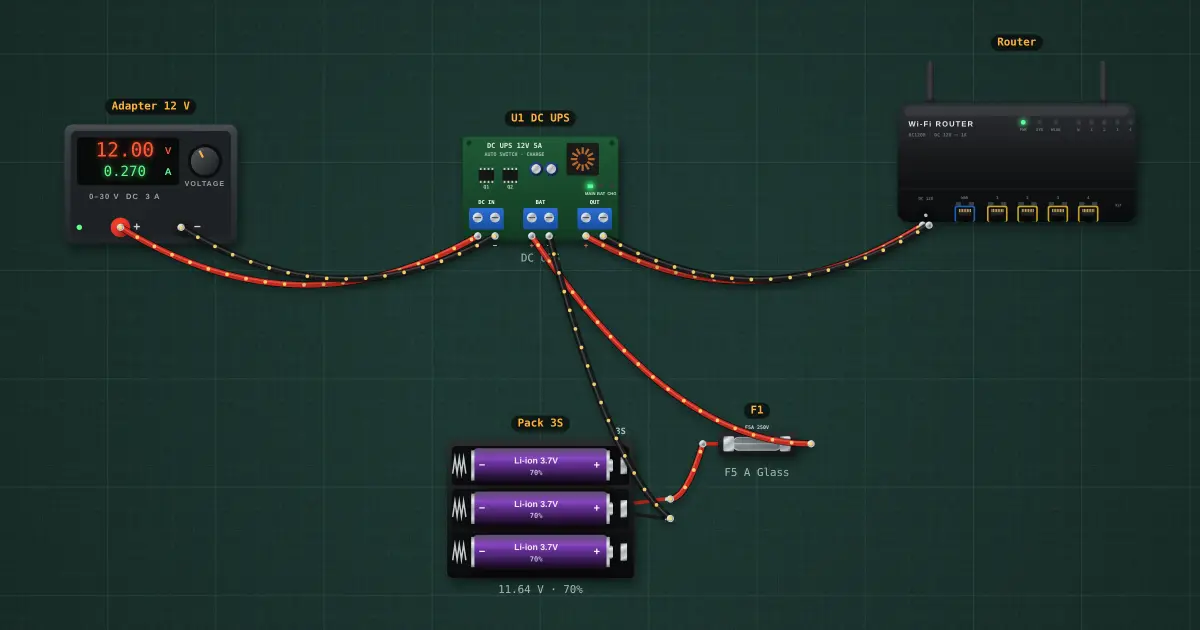
Router DC UPSA build with a test sheet: every number on this page is a test you can run.
The numbers
| Router + ONU/modem | 5–12 W, about 0.7 A at 12 V |
| 12 V 7 Ah SLA (use 50 %) | 5–6 h |
| 12 V 20 Ah LiFePO4 (use 90 %) | about 24 h |
| Starlink router | 50–75 W: a 24 V 30 Ah LiFePO4 for a night (see the Router DC UPS build) |
| Mains UPS 600 VA | 15–40 min on the same router |
Questions
Can I use a power bank?
A USB-C PD power bank with a 12 V trigger cable works for a 12 V router; a 20,000 mAh bank (about 70 Wh) gives 6–10 h. The USB power bank build on the lab shows the numbers.
Does the fibre still work in a brownout?
Usually yes for several hours: the ISP’s equipment has its own backup. Your ONU and router are the weak link.
What about the piso Wi-Fi box?
Same answer, with a coin acceptor on the same 12 V. See the piso Wi-Fi on solar page.
More questions
- Will my solar run the aircon at night?
- Why does my aircon trip the inverter when it starts?
- Does grid-tie solar work in a brownout?
- What breaker and wire size for an aircon?
- What breaker and wire size for a water heater?
- How big a solar panel and battery for a piso Wi-Fi?
Brownout backup · Piso Wi-Fi on solar · Solar PV simulator · House wiring simulator