Using an oscilloscope
A multimeter gives you one number. An oscilloscope draws the voltage against time, so you see the shape of a signal. The screen is a grid: each vertical division is worth the VOLTS/DIV setting, each horizontal division is worth the TIME/DIV setting. Count divisions and multiply. The trigger holds the picture still by starting every sweep at the same point of the wave.
Open this lesson in the labFree, in your browser, no account needed.
How it works
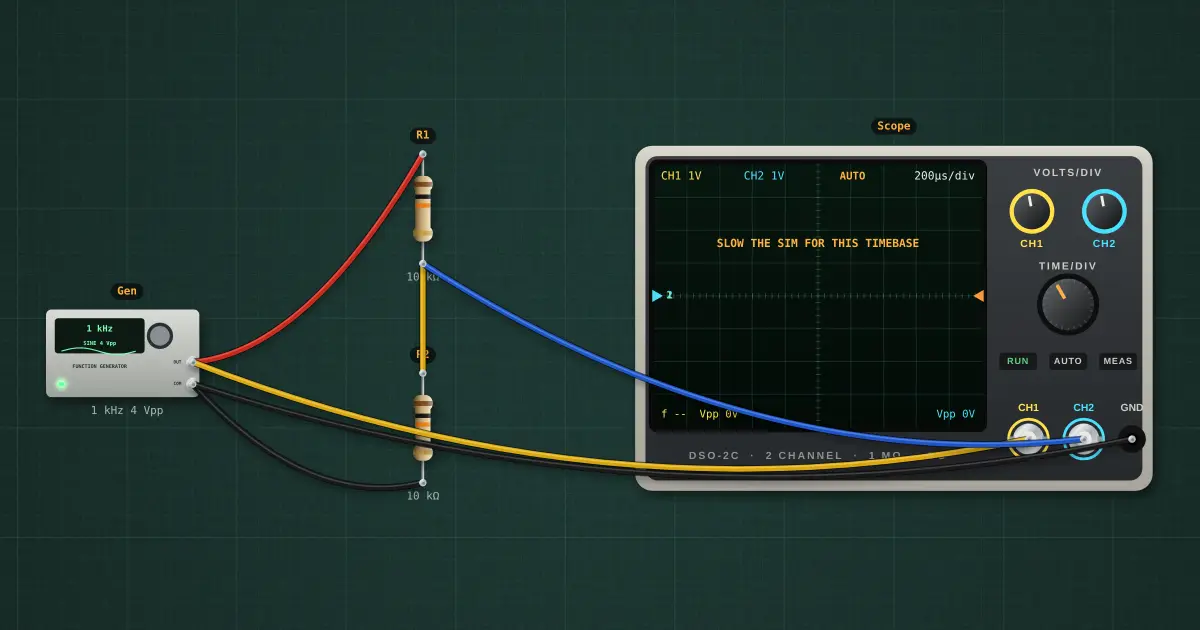
Vertical (volts): CH1 is set to 1 V/div. A 3.99 V peak-to-peak wave is 3.99 V ÷ 1 V = 4.0 divisions tall.
Horizontal (time): TIME/DIV is 200 µs. One period T = 1 ÷ f = 1 ÷ 1 kHz = 1 ms, so one cycle is 5.0 divisions wide and the 10-division screen shows 2.0 cycles.
Read it backwards, the way you will on a real scope: count the divisions, multiply by the setting. Height × V/div = Vpp; cycle width × time/div = T; f = 1 ÷ T.
From Vpp: Vpeak = Vpp ÷ 2 = 1.995 V; RMS (what a multimeter shows) = Vpeak ÷ √2 for a sine = 1.411 V.
Channel 2 (blue) is across R2, the bottom of a 10 kΩ / 10 kΩ divider: the same wave at half the height. The black ground clip goes to the circuit’s common: both channels measure against it.
Try it on the bench
- Select the scope and turn CH1 VOLTS/DIV to 0.5 V: the wave grows to twice the height, but the voltage has not changed. Only the scale has.
- Turn TIME/DIV to 1 ms: ten times as many cycles squeeze onto the screen. Turn it to 50 µs: you see a quarter of one cycle.
- Select the function generator and set it to 2 kHz: the cycles get half as wide. Count them to check the frequency yourself.
- Change the wave to square, then triangle. The peak-to-peak stays the same but the RMS changes (see the theory).
- Set the generator’s DC offset to 1 V: the whole wave lifts by one division and the CH1 average reads 1 V.
- Move the trigger level above the top of the wave: in AUTO the picture starts to drift, because nothing crosses the level any more. Bring it back and it locks again.
- Open Tools → Scope window for cursors and an FFT of the same signals.
Parts on the bench
In the course
Zen’s Electronics Design Mastery, module “AC & Reactance”.