4×4 keypad with Arduino Uno
How to connect a 4×4 keypad to an Arduino Uno: the wiring, a sketch that works, and a simulator to try it in your browser before you build it.
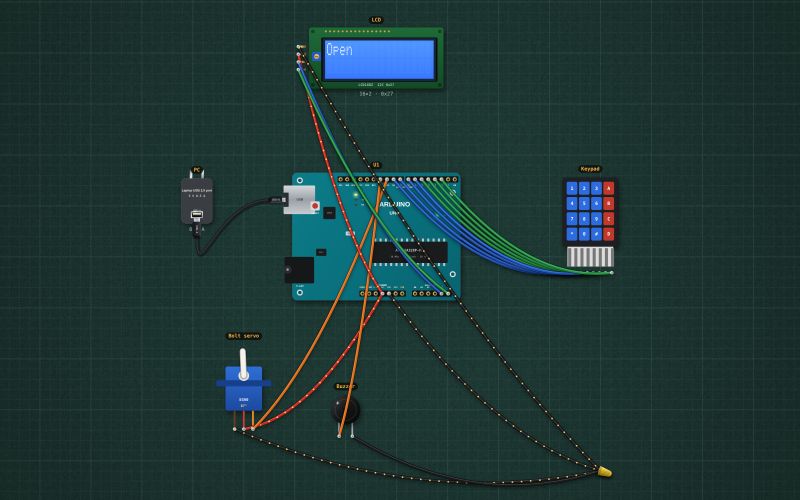
4×4 membrane keypad · 8 wires: rows R1–R4 and columns C1–C4 · pressing a key connects one row to one column · scan it by driving each row low and reading the columns with pull-ups · click a key to press it
Wiring
| 4×4 keypad pin | Arduino Uno |
|---|---|
| R1 | D9 ~ |
| R2 | D8 |
| R3 | D7 |
| R4 | D6 ~ |
| C1 | D5 ~ |
| C2 | D4 |
| C3 | D3 ~ (INT1) |
| C4 | D2 (INT0) |
Run it in the labFree, no account needed. The same wiring, with the sketch already on the board.
Code
From the project Arduino keypad door lock: 4×4 keypad, servo bolt and LCD. It also compiles in the Arduino IDE with the libraries it includes.
// Keypad door lock: type 2580 then # to open. * clears. Three wrong codes: locked out for 30 s.
// Keypad rows R1..R4 on D9..D6, columns C1..C4 on D5..D2. Servo (the bolt) D10. Active buzzer D11. I2C LCD on A4/A5.
#include <Wire.h>
#include <LiquidCrystal_I2C.h>
#include <Servo.h>
LiquidCrystal_I2C lcd(0x27, 16, 2);
Servo bolt;

const int ROWS[4] = {9, 8, 7, 6}, COLS[4] = {5, 4, 3, 2};
const char KEYS[4][4] = {{'1','2','3','A'}, {'4','5','6','B'}, {'7','8','9','C'}, {'*','0','#','D'}};
const long CODE = 2580;
long entered = 0;
int digits = 0, wrong = 0;
char lastKey = 0;
unsigned long openedAt = 0, lockedUntil = 0;
bool open = false;
char cand = 0;

char scan() {                                     // one row LOW at a time; a pressed key pulls its column LOW
  for (int r = 0; r < 4; r++) {
    for (int i = 0; i < 4; i++) digitalWrite(ROWS[i], i == r ? LOW : HIGH);
    delay(20);                                    // let the row settle (needed in the lab, which updates pins once a frame; harmless on a real Uno)
    for (int c = 0; c < 4; c++) if (digitalRead(COLS[c]) == LOW) return KEYS[r][c];
  }
  return 0;
}

void prompt() { lcd.clear(); lcd.print("Enter code:"); lcd.setCursor(0, 1); entered = 0; digits = 0; }

void setup() {
  Serial.begin(9600);
  for (int i = 0; i < 4; i++) { pinMode(ROWS[i], OUTPUT); pinMode(COLS[i], INPUT_PULLUP); }
  pinMode(11, OUTPUT);
  delay(50);                               // let the pull-ups settle before the first scan

  bolt.attach(10); bolt.write(0);                  // 0° locked, 90° open
  lcd.init(); lcd.backlight(); prompt();
}

void loop() {
  unsigned long now = millis();
  if (open && now - openedAt > 5000) { bolt.write(0); open = false; Serial.println("Locked"); prompt(); }
  if (now < lockedUntil) return;
  char k = scan();
  if (k != cand) { cand = k; return; }              // debounce: the same answer two scans running
  if (k == lastKey) return;                         // act once per press
  lastKey = k;
  if (k == 0) return;
  delay(20);                                        // debounce
  if (k == '*') { prompt(); return; }
  if (k == '#') {
    if (digits == 4 && entered == CODE) {
      bolt.write(90); open = true; openedAt = now; wrong = 0;
      lcd.clear(); lcd.print("Open"); Serial.println("Open");
    } else {
      wrong++; Serial.println("Wrong code");
      lcd.clear(); lcd.print("Wrong code");
      digitalWrite(11, HIGH); delay(800); digitalWrite(11, LOW);
      if (wrong >= 3) { lockedUntil = millis() + 30000; lcd.setCursor(0, 1); lcd.print("Wait 30 s"); Serial.println("Locked out"); wrong = 0; }
      else prompt();
    }
    return;
  }
  if (k >= '0' && k <= '9' && digits < 8) { entered = entered * 10 + (k - '0'); digits++; lcd.print('*'); }
}
Also used in
For teachers
The project runs in the browser on a laptop or a phone, so every student can build and test it before the class touches a real board. Assign it on the teacher's page and set what counts as done: a prediction, a hidden fault found, or a passing test sheet.