7-segment display with Arduino Uno
How to connect a 7-segment display to an Arduino Uno: the wiring, a sketch that works, and a simulator to try it in your browser before you build it.
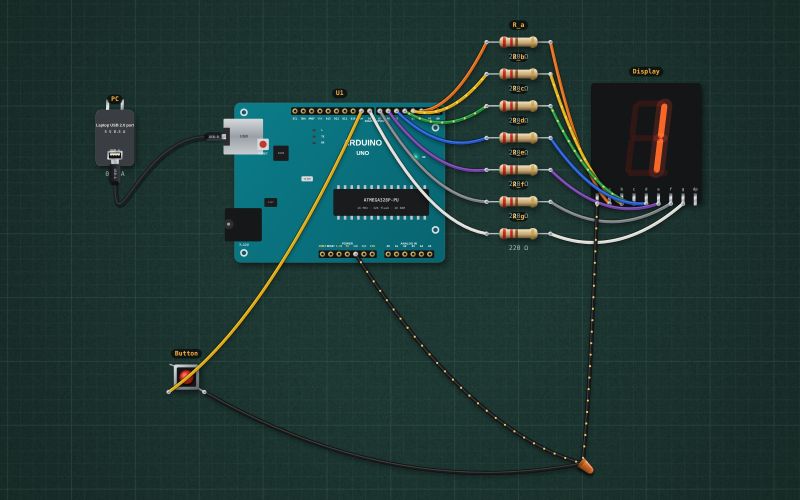
0.56" red 7-segment, common cathode · 330 Ω per segment built in · ~10 mA per segment
Wiring
| 7-segment display pin | Arduino Uno |
|---|---|
| a | D2 (INT0) (through a 220 Ω resistor) |
| b | D3 ~ (INT1) (through a 220 Ω resistor) |
| c | D4 (through a 220 Ω resistor) |
| d | D5 ~ (through a 220 Ω resistor) |
| e | D6 ~ (through a 220 Ω resistor) |
| f | D7 (through a 220 Ω resistor) |
| g | D8 (through a 220 Ω resistor) |
| COM (cathode) | GND |
Run it in the labFree, no account needed. The same wiring, with the sketch already on the board.
Code
From the project Arduino electronic dice on a 7-segment display. It also compiles in the Arduino IDE with the libraries it includes.
// Electronic dice: press the button, it rolls, then shows 1 to 6.
// 7-segment display (common cathode): a..g on D2..D8, COM to GND. Button D9 to GND.
const byte DIGITS[7] = {0x3F, 0x06, 0x5B, 0x4F, 0x66, 0x6D, 0x7D};   // 0..6, bit 0 = segment a
const int BTN = 9;
bool rolling = false;
unsigned long rollStart = 0, lastFlip = 0;
int shown = 0;

void show(int n) {
  for (int s = 0; s < 7; s++) digitalWrite(2 + s, (DIGITS[n] >> s) & 1);
  shown = n;
}

void setup() {
  Serial.begin(9600);
  for (int p = 2; p <= 8; p++) pinMode(p, OUTPUT);
  pinMode(BTN, INPUT_PULLUP);
  delay(50);                               // let the pull-ups settle: a pin can read LOW for an instant at power-up
  randomSeed(analogRead(A0));
  show(0);
}

void loop() {
  unsigned long now = millis();
  if (!rolling && digitalRead(BTN) == LOW) { rolling = true; rollStart = now; }
  if (rolling) {
    if (now - lastFlip > 60) { show(random(1, 7)); lastFlip = now; }          // spin
    if (now - rollStart > 1000 && digitalRead(BTN) == HIGH) {
      rolling = false;
      show(random(1, 7));                                                     // the throw
      Serial.print("Rolled ");
      Serial.println(shown);
    }
  }
}
Also used in
For teachers
The project runs in the browser on a laptop or a phone, so every student can build and test it before the class touches a real board. Assign it on the teacher's page and set what counts as done: a prediction, a hidden fault found, or a passing test sheet.