HC-SR04 ultrasonic distance sensor with Arduino Uno
How to connect an HC-SR04 ultrasonic distance sensor to an Arduino Uno: the wiring, a sketch that works, and a simulator to try it in your browser before you build it.
HC-SR04 ultrasonic ranger · 5 V · send a 10 µs pulse on TRIG; ECHO then goes HIGH for 58 µs per cm (out to about 4 m) · ECHO is a 5 V signal: divide it down for a 3.3 V board
Wiring
| HC-SR04 ultrasonic distance sensor pin | Arduino Uno |
|---|---|
| VCC | 5V |
| TRIG | D9 ~ |
| ECHO | D10 ~ |
| GND | GND |
On a 5 V Arduino the HC-SR04 connects straight: TRIG and ECHO to any two digital pins.
Run it in the labFree, no account needed. The same wiring, with the sketch already on the board.
Code
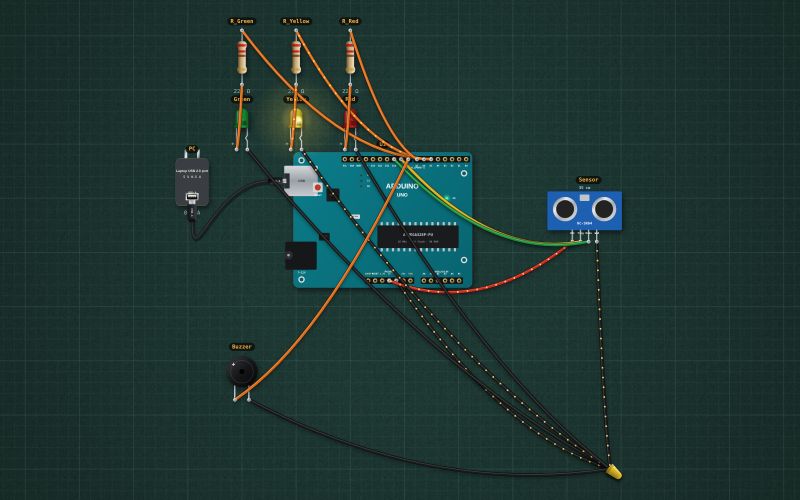
From the project Arduino parking sensor: HC-SR04, three LEDs and a beeper. It also compiles in the Arduino IDE with the libraries it includes.
// Parking sensor: an HC-SR04 measures the gap; LEDs and a beeper say how close.
// TRIG D9, ECHO D10. Green D5, yellow D6, red D7. Active buzzer D8.
const int TRIG = 9, ECHO = 10, GREEN = 5, YELLOW = 6, RED = 7, BUZ = 8;
unsigned long lastPing = 0, lastBeep = 0;
float cm = 400;
bool beepOn = false;

float distance() {
  digitalWrite(TRIG, LOW); delayMicroseconds(2);
  digitalWrite(TRIG, HIGH); delayMicroseconds(10); digitalWrite(TRIG, LOW);   // a 10 µs pulse starts a ping
  unsigned long us = pulseIn(ECHO, HIGH, 30000);                               // echo time, 30 ms = out of range
  if (us == 0) return 400;
  return us / 58.0;                                                            // sound: 343 m/s, there and back
}

void setup() {
  Serial.begin(9600);
  pinMode(TRIG, OUTPUT); pinMode(ECHO, INPUT);
  pinMode(GREEN, OUTPUT); pinMode(YELLOW, OUTPUT); pinMode(RED, OUTPUT); pinMode(BUZ, OUTPUT);
}

void loop() {
  unsigned long now = millis();
  if (now - lastPing >= 100) {                     // 10 pings a second
    lastPing = now;
    cm = distance();
    digitalWrite(GREEN, cm > 60);
    digitalWrite(YELLOW, cm > 20 && cm <= 60);
    digitalWrite(RED, cm <= 20);
    Serial.print(cm, 1); Serial.println(" cm");
  }
  if (cm <= 10) { digitalWrite(BUZ, HIGH); return; }        // closer than 10 cm: steady tone, stop!
  if (cm > 60) { digitalWrite(BUZ, LOW); return; }          // far: quiet
  unsigned long gap = cm * 10;                              // 60 cm: beep every 600 ms … 11 cm: every 110 ms
  if (now - lastBeep >= (beepOn ? 60 : gap)) { beepOn = !beepOn; digitalWrite(BUZ, beepOn); lastBeep = now; }
}
Also used in
For teachers
The project runs in the browser on a laptop or a phone, so every student can build and test it before the class touches a real board. Assign it on the teacher's page and set what counts as done: a prediction, a hidden fault found, or a passing test sheet.