HX711 load-cell ADC with ESP32
How to connect an HX711 load-cell ADC to an ESP32: the wiring, a sketch that works, and a simulator to try it in your browser before you build it.
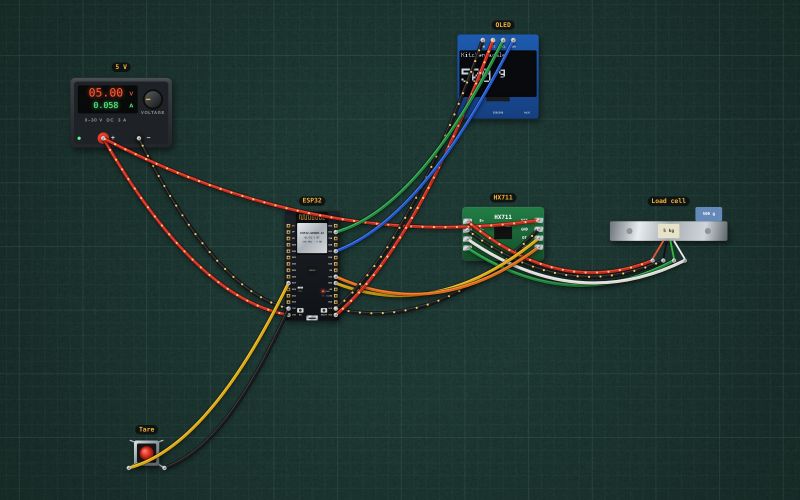
HX711 breakout · 24-bit ADC with a gain-128 bridge amplifier · supplies the bridge excitation (E+ ≈ 4.3 V from 5 V) · reads A+ − A− (±20 mV full scale at gain 128) · two-wire DT/SCK interface, 10 samples per second
Wiring
| HX711 load-cell ADC pin | ESP32 |
|---|---|
| VCC | + of the 5 V supply |
| GND | GND |
| DT | RX2 |
| SCK | TX2 |
Calibrate once with a known weight: change the scale factor until it reads right. Keep the load cell's four wires short and away from motors.
Run it in the labFree, no account needed. The same wiring, with the sketch already on the board.
Code
From the project ESP32 kitchen scale: HX711, load cell and OLED. It also compiles in the Arduino IDE (ESP32 core 3.x) with the libraries it includes.
// Kitchen scale: an HX711 and a 5 kg load cell (DT GPIO16, SCK GPIO17), the weight on a 0.96" OLED (I2C 21/22).
// The button on GPIO27 zeroes it (tare). Calibrate once: put a known weight on and adjust SCALE until it reads right.
#include <Wire.h>
#include <Adafruit_GFX.h>
#include <Adafruit_SSD1306.h>
#include <HX711.h>
Adafruit_SSD1306 display(128, 64, &Wire, -1);
HX711 scale;
const int HX_DT = 16, HX_SCK = 17, TARE = 27;
const float SCALE = 429.5;               // counts per gram for a 5 kg, 1 mV/V cell at gain 128

void setup() {
  Serial.begin(115200);
  Wire.begin(21, 22);
  if (!display.begin(SSD1306_SWITCHCAPVCC, 0x3C)) Serial.println("OLED not found");
  pinMode(TARE, INPUT_PULLUP);
  scale.begin(HX_DT, HX_SCK);
  scale.set_scale(SCALE);
  scale.tare(10);                        // whatever is on it now reads zero
}

void loop() {
  if (digitalRead(TARE) == LOW) { scale.tare(10); Serial.println("Tare"); }
  float g = scale.get_units(5);
  if (g > -0.5 && g < 0.5) g = 0;
  display.clearDisplay();
  display.setTextColor(SSD1306_WHITE);
  display.setTextSize(1); display.setCursor(0, 0); display.print("Kitchen scale");
  display.setTextSize(3); display.setCursor(0, 24); display.print(g, 0);
  display.setTextSize(2); display.print(" g");
  display.display();
  Serial.print(g, 1); Serial.println(" g");
  delay(300);
}
For teachers
The project runs in the browser on a laptop or a phone, so every student can build and test it before the class touches a real board. Assign it on the teacher's page and set what counts as done: a prediction, a hidden fault found, or a passing test sheet.