Potentiometer with Arduino Uno
How to connect a Potentiometer to an Arduino Uno: the wiring, a sketch that works, and a simulator to try it in your browser before you build it.
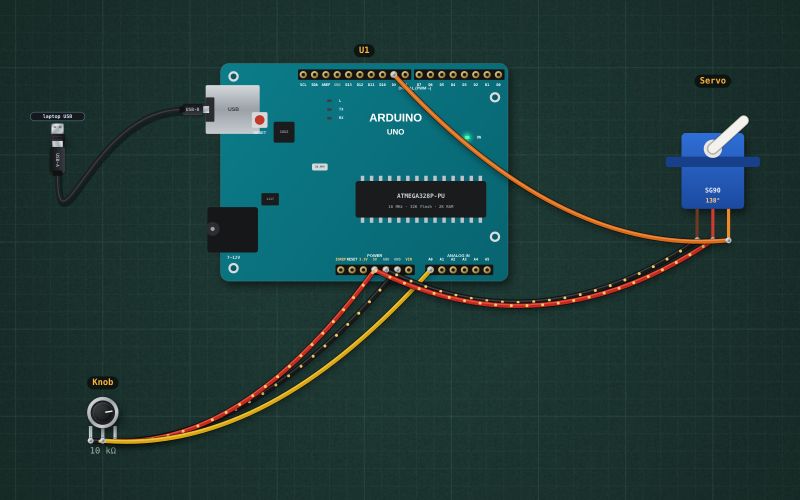
Rotary · 10 kΩ linear
Wiring
| Potentiometer pin | Arduino Uno |
|---|---|
| pin 1 | GND |
| pin 2 | A0 |
| pin 3 | 5V |
Run it in the labFree, no account needed. The same wiring, with the sketch already on the board.
Code
From the project Arduino servo that follows a knob. It also compiles in the Arduino IDE with the libraries it includes.
// Servo follows a knob: a 10 kΩ pot on A0 sets the angle of a hobby servo on D9 (0 to 180°).
#include <Servo.h>
Servo arm;
int lastAngle = -1;

void setup() {
  Serial.begin(9600);
  arm.attach(9);
}

void loop() {
  int angle = map(analogRead(A0), 0, 1023, 0, 180);
  if (abs(angle - lastAngle) > 1) {          // ignore 1° of jitter from the pot
    arm.write(angle); lastAngle = angle;
    Serial.print("Angle "); Serial.println(angle);
  }
  delay(15);
}
Also used in
For teachers
The project runs in the browser on a laptop or a phone, so every student can build and test it before the class touches a real board. Assign it on the teacher's page and set what counts as done: a prediction, a hidden fault found, or a passing test sheet.