Soil moisture sensor with Arduino Uno
How to connect a Soil moisture sensor to an Arduino Uno: the wiring, a sketch that works, and a simulator to try it in your browser before you build it.
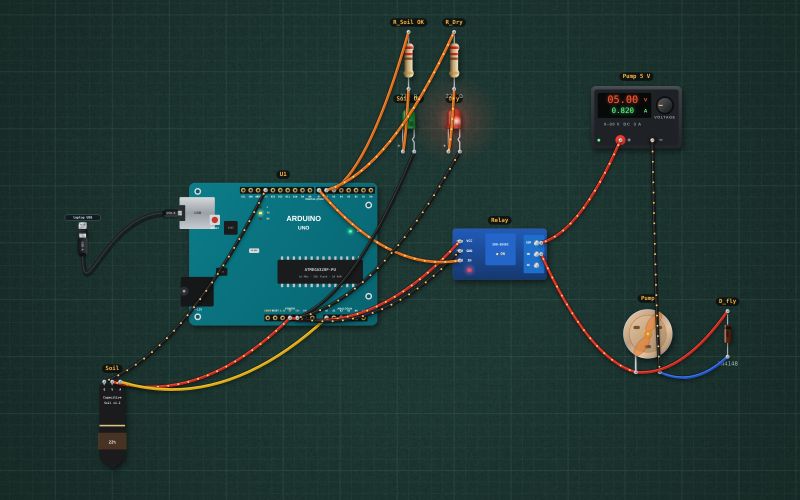
Capacitive soil-moisture probe v1.2 · 3.3–5.5 V · analog output about 2.9 V in dry air falling to about 1.3 V in wet soil · no exposed metal, so it does not corrode
Wiring
| Soil moisture sensor pin | Arduino Uno |
|---|---|
| GND | GND |
| VCC | 5V |
| AOUT | A0 |
Use a capacitive sensor (v1.2), not the two-pronged resistive kind, which corrodes within weeks. Calibrate the dry and wet readings in your own soil.
Run it in the labFree, no account needed. The same wiring, with the sketch already on the board.
Code
From the project Arduino automatic plant watering: soil sensor, relay and pump. It also compiles in the Arduino IDE with the libraries it includes.
// Automatic plant watering: a capacitive soil sensor on A0 and a relay module that runs a 5 V pump.
// Below 35 % moisture the pump runs in 3 s bursts with 10 s pauses, so the water soaks in before the next reading.
// Green LED D5: soil OK. Red LED D6: dry. The relay module (IN on D7) switches on when IN is LOW.
const int SOIL = A0, RELAY = 7, OK_LED = 5, DRY_LED = 6;
const int DRY_RAW = 593, WET_RAW = 266;   // about 2.9 V in dry air and 1.3 V in water, on the 5 V reference
bool pumping = false;
unsigned long pumpAt = 0, restAt = 0, shownAt = 0;

int moisture() {
  int raw = analogRead(SOIL);
  return constrain(map(raw, DRY_RAW, WET_RAW, 0, 100), 0, 100);
}

void setup() {
  Serial.begin(9600);
  digitalWrite(RELAY, HIGH);              // pump off before the pin becomes an output
  pinMode(RELAY, OUTPUT);
  pinMode(OK_LED, OUTPUT); pinMode(DRY_LED, OUTPUT);
}

void loop() {
  unsigned long now = millis();
  int m = moisture();
  bool dry = m < 35;
  digitalWrite(OK_LED, dry ? LOW : HIGH);
  digitalWrite(DRY_LED, dry ? HIGH : LOW);
  if (pumping && now - pumpAt >= 3000) { pumping = false; restAt = now; digitalWrite(RELAY, HIGH); Serial.println("Pump off, soaking"); }
  if (!pumping && dry && (restAt == 0 || now - restAt >= 10000)) { pumping = true; pumpAt = now; digitalWrite(RELAY, LOW); Serial.println("Pump on"); }
  if (now - shownAt >= 1000) { shownAt = now; Serial.print("Moisture "); Serial.print(m); Serial.println(" %"); }
}
For teachers
The project runs in the browser on a laptop or a phone, so every student can build and test it before the class touches a real board. Assign it on the teacher's page and set what counts as done: a prediction, a hidden fault found, or a passing test sheet.