MAX7219 8-digit display with ESP32
How to connect an MAX7219 8-digit display to an ESP32: the wiring, a sketch that works, and a simulator to try it in your browser before you build it.
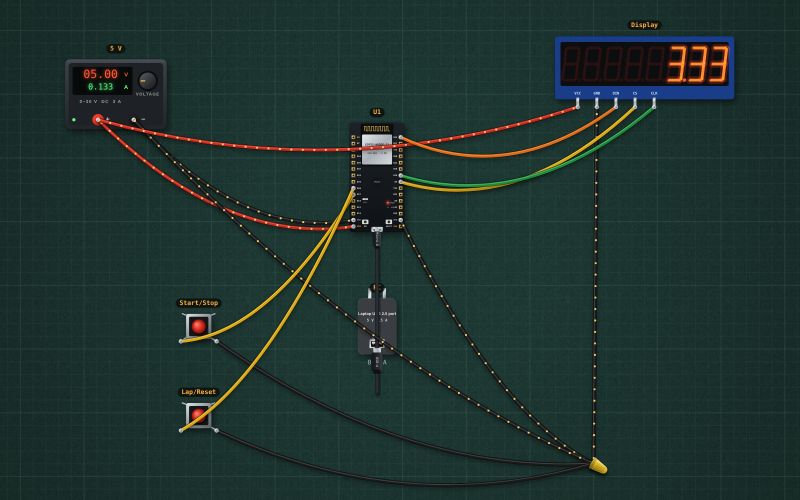
MAX7219 LED driver with eight 7-segment digits · SPI write-only: DIN, CLK, CS (load) · 5 V · send register then data, 16 bits per frame
Wiring
| MAX7219 8-digit display pin | ESP32 |
|---|---|
| VCC | + of the 5 V supply |
| GND | GND |
| DIN | GPIO23 |
| CS | GPIO5 |
| CLK | GPIO18 |
The MAX7219 runs on 5 V and wants 3.5 V for a logic high; most modules work from an ESP32's 3.3 V anyway. If the digits show garbage, add a 74HCT125 buffer.
Run it in the labFree, no account needed. The same wiring, with the sketch already on the board.
Code
From the project ESP32 stopwatch with lap times on an 8-digit MAX7219 display. It also compiles in the Arduino IDE (ESP32 core 3.x) with the libraries it includes.
// Stopwatch on a MAX7219 8-digit display: Start/Stop on GPIO27, Lap/Reset on GPIO26 (buttons to GND).
// MAX7219: DIN GPIO23, CLK GPIO18, CS GPIO5 (VSPI). Shows seconds with hundredths: 12.34
#include <SPI.h>
const int CS = 5, START = 27, LAP = 26;
bool running = false, lapShown = false;
unsigned long startedAt = 0, elapsed = 0, lapValue = 0;
int lastStart = HIGH, lastLap = HIGH;

void reg(byte r, byte v) { digitalWrite(CS, LOW); SPI.transfer(r); SPI.transfer(v); digitalWrite(CS, HIGH); }

void showTime(unsigned long ms) {
  unsigned long cs = ms / 10;                               // hundredths
  for (int d = 1; d <= 8; d++) {
    byte digit = cs % 10;
    if (d > 3 && cs == 0) digit = 15;                       // blank leading zeros (keep 0.00)
    if (d == 3) digit |= 0x80;                              // decimal point after the seconds
    reg(d, digit);
    cs /= 10;
  }
}

void setup() {
  Serial.begin(115200);
  pinMode(CS, OUTPUT); digitalWrite(CS, HIGH);
  pinMode(START, INPUT_PULLUP); pinMode(LAP, INPUT_PULLUP);
  SPI.begin(18, 19, 23, CS);
  reg(0x0F, 0); reg(0x0C, 1); reg(0x0B, 7); reg(0x09, 0xFF); reg(0x0A, 8);   // test off, on, 8 digits, BCD decode, brightness
  showTime(0);
  delay(50);                                   // let the pull-ups settle, then remember how the buttons start,
  lastStart = digitalRead(START);              // so power-up doesn't look like a press
  lastLap = digitalRead(LAP);
}

void loop() {
  int s = digitalRead(START), l = digitalRead(LAP);
  if (s == LOW && lastStart == HIGH) {                         // a press (falling edge)
    if (running) { elapsed += millis() - startedAt; running = false; Serial.print("Stop "); Serial.println(elapsed / 1000.0, 2); }
    else { startedAt = millis(); running = true; lapShown = false; Serial.println("Start"); }
    delay(20);
  }
  if (l == LOW && lastLap == HIGH) {
    if (running) { lapValue = elapsed + millis() - startedAt; lapShown = !lapShown; Serial.print("Lap "); Serial.println(lapValue / 1000.0, 2); }
    else { elapsed = 0; lapShown = false; Serial.println("Reset"); }
    delay(20);
  }
  lastStart = s; lastLap = l;
  unsigned long now = running ? elapsed + millis() - startedAt : elapsed;
  showTime(lapShown ? lapValue : now);
}
Also used in
For teachers
The project runs in the browser on a laptop or a phone, so every student can build and test it before the class touches a real board. Assign it on the teacher's page and set what counts as done: a prediction, a hidden fault found, or a passing test sheet.