N-channel MOSFET with ESP32
How to connect a N-channel MOSFET to an ESP32: the wiring, a sketch that works, and a simulator to try it in your browser before you build it.
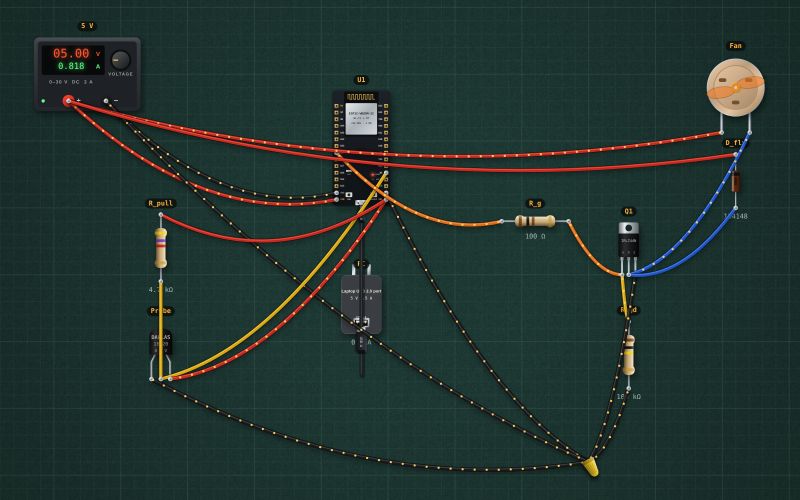
IRLZ44N · TO-220 · logic level · Vth ≈ 1.8 V
Wiring
| N-channel MOSFET pin | ESP32 |
|---|---|
| G | GPIO25 (through a 100 Ω resistor), GND (through a 100 kΩ resistor) |
| S | GND |
Run it in the labFree, no account needed. The same wiring, with the sketch already on the board.
Code
From the project ESP32 temperature-controlled fan: DS18B20 and a MOSFET. It also compiles in the Arduino IDE (ESP32 core 3.x) with the libraries it includes.
// Temperature-controlled fan: under 26 °C off, 26-34 °C proportional, over 34 °C full speed.
// DS18B20 probe on GPIO4 (4.7k pull-up to 3V3). Logic-level MOSFET gate on GPIO25 (PWM, 25 kHz). Fan on 5 V through the MOSFET.
#include <OneWire.h>
#include <DallasTemperature.h>
OneWire bus(4);
DallasTemperature probe(&bus);
const int FAN = 25;
unsigned long last = 0;

void setup() {
  Serial.begin(115200);
  probe.begin();
  ledcAttach(FAN, 25000, 8);      // 25 kHz, 8 bits (ESP32 core 3.x): above hearing, so the fan doesn't whine
}

void loop() {
  if (millis() - last < 2000) return;
  last = millis();
  probe.requestTemperatures();
  float t = probe.getTempCByIndex(0);
  if (t == DEVICE_DISCONNECTED_C) { Serial.println("Probe not answering: fan full"); ledcWrite(FAN, 255); return; }   // fail safe
  int duty;
  if (t < 26) duty = 0;
  else if (t > 34) duty = 255;
  else duty = map(t * 10, 260, 340, 80, 255);                      // 80: the slowest the fan still starts at
  ledcWrite(FAN, duty);
  Serial.print("T "); Serial.print(t, 1); Serial.print(" C  fan "); Serial.print(duty * 100 / 255); Serial.println(" %");
}
Also used in
For teachers
The project runs in the browser on a laptop or a phone, so every student can build and test it before the class touches a real board. Assign it on the teacher's page and set what counts as done: a prediction, a hidden fault found, or a passing test sheet.