Temperature-controlled fan
Speeds a fan up as it gets warmer. A logic-level MOSFET lets a 3.3 V pin switch the fan’s 5 V; the diode catches the motor’s kick when the MOSFET turns off. The ESP32 reads the DS18B20 every 2 s and sets the PWM duty: off below 26 °C, rising from 30 % at 26 °C to full at 34 °C. The PWM runs at 25 kHz, above hearing. If the sensor stops answering, the fan goes to full: the safe failure. On the real thing: an IRLZ44N (or AO3400) is fine for a small 5 V fan; a plain IRFZ44N is not logic level and stays half on at 3.3 V. Use a 2-wire fan, or a 4-wire PC fan with its PWM wire on GPIO25 instead of the MOSFET.
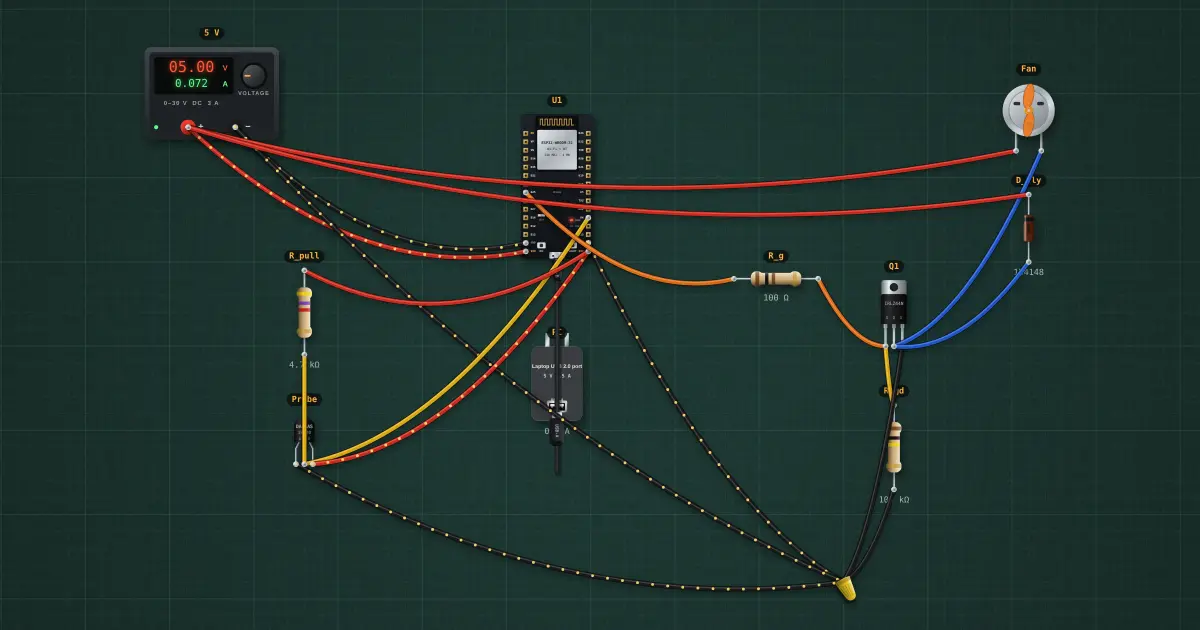
Build it in the labGuided build, test sheet and fault finding, free in your browser.
Parts list
- Bench power supply
- ESP32 DevKit
- USB charger / port
- DS18B20 temperature sensor
- 3 × Resistor
- N-channel MOSFET
- DC motor
- Signal diode
Test procedure
Each test has an expected value and a pass range, like a factory test sheet:
- Cool: fan off
- Warm: part speed
- Hot: full speed
How it works
What it does: Speeds a fan up as it gets warmer.
Build it (guided or ready-made), then run its test procedure below. Every test has an expected value and a pass range, just like a factory test sheet.
Things to try
- Break the probe’s data wire: the sketch can’t read it and runs the fan flat out. Why is that the right failure?
- Change 80 to 0 in map(): at low duty the fan only hums. Real fans need a minimum to start.
- Add hysteresis: switch on at 27 °C, off at 25 °C, so the fan doesn’t stutter at 26.
Background
Every PC since the late 1990s does this with its CPU fan; the 25 kHz PWM fan standard came from Intel in 2005.