Weather station on an OLED
Shows temperature, humidity, pressure and a comfort word on a small screen. Two I²C devices share the same two wires: the BME280 (address 0x76) and the OLED (0x3C). Every 2 s the ESP32 reads temperature, humidity and pressure and draws them into the OLED’s 1 KB frame buffer, which display.display() then sends over I²C. A simple rule turns the numbers into a word: comfortable, humid, cool or too hot. On the real thing: many BME280 boards answer at 0x77 instead (Adafruit’s do), and some OLEDs at 0x3D; if the Serial Monitor says “not found”, change the address. A BMP280 looks the same but has no humidity.
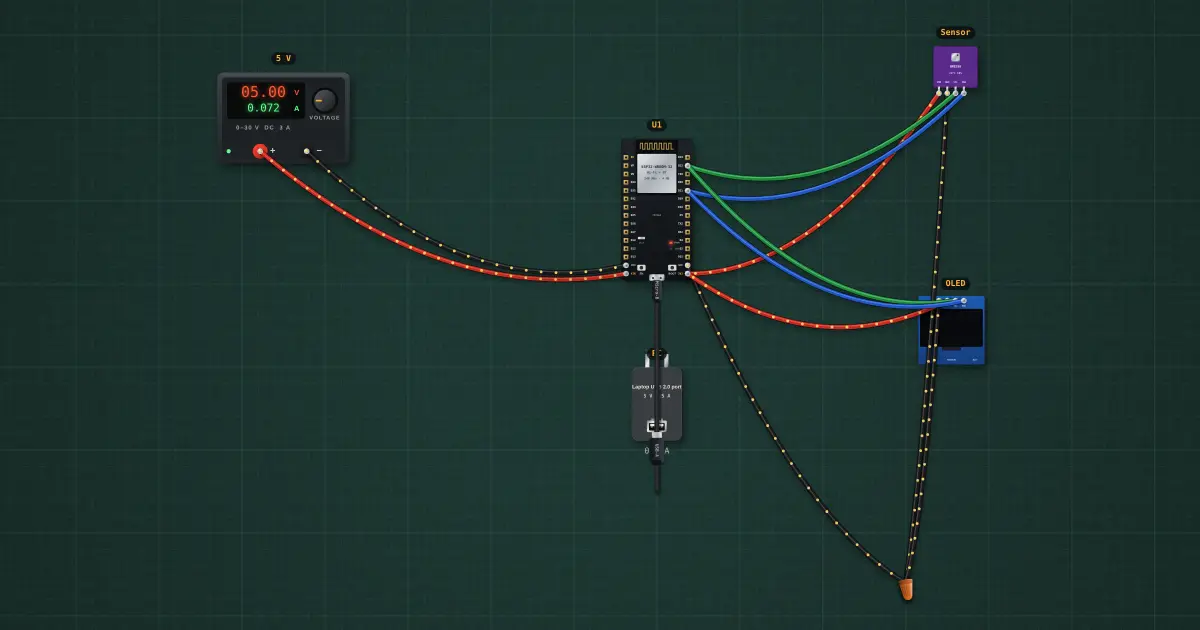
Build it in the labGuided build, test sheet and fault finding, free in your browser.
Parts list
Test procedure
Each test has an expected value and a pass range, like a factory test sheet:
- Temperature read correctly
- Pressure read correctly
- The OLED is drawn
- The comfort word follows the weather
How it works
What it does: Shows temperature, humidity, pressure and a comfort word on a small screen.
Build it (guided or ready-made), then run its test procedure below. Every test has an expected value and a pass range, just like a factory test sheet.
Things to try
- Select the sensor and drag the temperature: the screen follows within 2 s.
- Run the I2C scanner example on this bench: it finds 0x3C and 0x76.
- Pressure falling 3 hPa in 3 hours means a storm is coming: keep the last readings in an array and show an arrow.
Background
Home weather stations went digital in the 1980s; the BME280 (2015) put all three sensors in a 2.5 mm package.