Potentiometer with Arduino Nano
How to connect a Potentiometer to an Arduino Nano: the wiring, a sketch that works, and a simulator to try it in your browser before you build it.
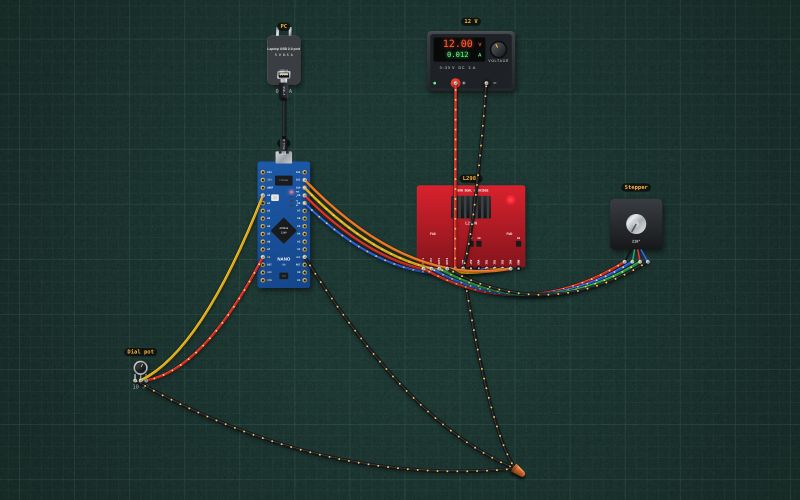
Rotary · 10 kΩ linear
Wiring
| Potentiometer pin | Arduino Nano |
|---|---|
| pin 1 | GND |
| pin 2 | A0 |
| pin 3 | 5V |
Run it in the labFree, no account needed. The same wiring, with the sketch already on the board.
Code
From the project Arduino stepper that follows a dial: pot, L298N and a NEMA 17. It also compiles in the Arduino IDE with the libraries it includes.
// Stepper dial: the pot sets the angle (0-360°) and a NEMA 17 follows it.
// Pot wiper A0. L298N IN1..IN4 on D8..D11 (ENA and ENB jumpers on). 200 full steps per turn (1.8° each).
const int IN[4] = {8, 9, 10, 11};
const int SEQ[4][4] = {{1,0,1,0}, {0,1,1,0}, {0,1,0,1}, {1,0,0,1}};   // coil A, then coil B, each reversed in turn
const long STEPS_PER_TURN = 200;
long pos = 0;
unsigned long lastStep = 0, lastPrint = 0;

void coils(int s) { for (int i = 0; i < 4; i++) digitalWrite(IN[i], SEQ[s][i]); }
void release() { for (int i = 0; i < 4; i++) digitalWrite(IN[i], LOW); }    // both bridges off when parked

void setup() {
  Serial.begin(9600);
  for (int i = 0; i < 4; i++) pinMode(IN[i], OUTPUT);
  coils(0);                                                     // the rotor snaps to step 0
}

void loop() {
  unsigned long now = millis();
  long target = (long)analogRead(A0) * STEPS_PER_TURN / 1024;
  if (target != pos && now - lastStep >= 30) {                  // 30 ms a step: 10 RPM
    pos += (target > pos) ? 1 : -1;
    coils(((pos % 4) + 4) % 4);
    lastStep = now;
  } else if (target == pos && now - lastStep > 500) {
    release();                                                  // half a second after arriving: coils off, no heat
  }
  if (now - lastPrint > 250) {
    lastPrint = now;
    Serial.print("target "); Serial.print(target * 360 / STEPS_PER_TURN);
    Serial.print("°  at "); Serial.print(pos * 360 / STEPS_PER_TURN); Serial.println("°");
  }
}
Also used in
For teachers
The project runs in the browser on a laptop or a phone, so every student can build and test it before the class touches a real board. Assign it on the teacher's page and set what counts as done: a prediction, a hidden fault found, or a passing test sheet.