Push button with Arduino Uno
How to connect a Push button to an Arduino Uno: the wiring, a sketch that works, and a simulator to try it in your browser before you build it.
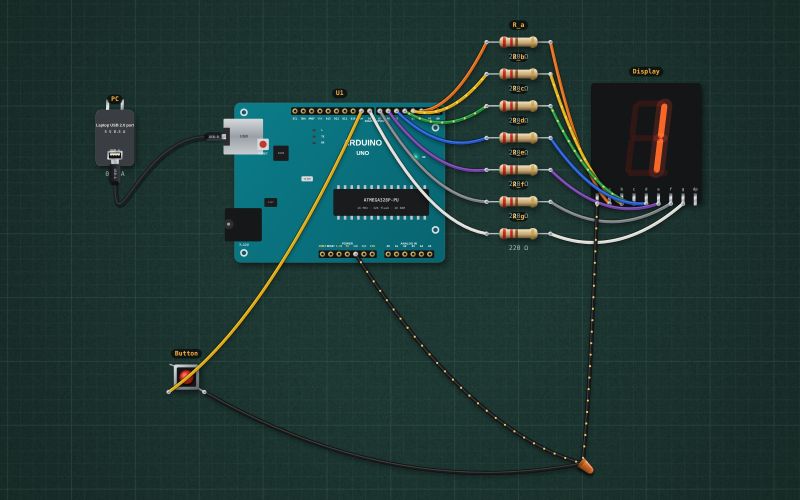
12 mm tactile · momentary · hold to close
Wiring
| Push button pin | Arduino Uno |
|---|---|
| pin 1 | D9 ~ |
| pin 2 | GND |
With INPUT_PULLUP no external resistor is needed: the pin reads HIGH, and LOW while the button is pressed.
Run it in the labFree, no account needed. The same wiring, with the sketch already on the board.
Code
From the project Arduino electronic dice on a 7-segment display. It also compiles in the Arduino IDE with the libraries it includes.
// Electronic dice: press the button, it rolls, then shows 1 to 6.
// 7-segment display (common cathode): a..g on D2..D8, COM to GND. Button D9 to GND.
const byte DIGITS[7] = {0x3F, 0x06, 0x5B, 0x4F, 0x66, 0x6D, 0x7D};   // 0..6, bit 0 = segment a
const int BTN = 9;
bool rolling = false;
unsigned long rollStart = 0, lastFlip = 0;
int shown = 0;

void show(int n) {
  for (int s = 0; s < 7; s++) digitalWrite(2 + s, (DIGITS[n] >> s) & 1);
  shown = n;
}

void setup() {
  Serial.begin(9600);
  for (int p = 2; p <= 8; p++) pinMode(p, OUTPUT);
  pinMode(BTN, INPUT_PULLUP);
  delay(50);                               // let the pull-ups settle: a pin can read LOW for an instant at power-up
  randomSeed(analogRead(A0));
  show(0);
}

void loop() {
  unsigned long now = millis();
  if (!rolling && digitalRead(BTN) == LOW) { rolling = true; rollStart = now; }
  if (rolling) {
    if (now - lastFlip > 60) { show(random(1, 7)); lastFlip = now; }          // spin
    if (now - rollStart > 1000 && digitalRead(BTN) == HIGH) {
      rolling = false;
      show(random(1, 7));                                                     // the throw
      Serial.print("Rolled ");
      Serial.println(shown);
    }
  }
}
Also used in
- Arduino traffic light with a pedestrian button
- Arduino reaction-time game on an I²C LCD
- Arduino Simon memory game: four LEDs, four buttons, a buzzer
- Arduino motion alarm: PIR sensor, siren and arm button
- Traffic light with a pedestrian button
- Reaction-time game
- Electronic dice
- Simon memory game
For teachers
The project runs in the browser on a laptop or a phone, so every student can build and test it before the class touches a real board. Assign it on the teacher's page and set what counts as done: a prediction, a hidden fault found, or a passing test sheet.