Traffic light with a pedestrian button
Cars green until someone presses the button; yellow, then walk, then a flashing walk light, then green again. A crossing light is a state machine: cars green, then (after a button press) yellow, red with the walk light, a flashing walk light, and green again. The sketch never calls delay(): it remembers when the current state began (millis()) and checks every pass of loop() whether it is time to move on, so it can watch the button the whole time.
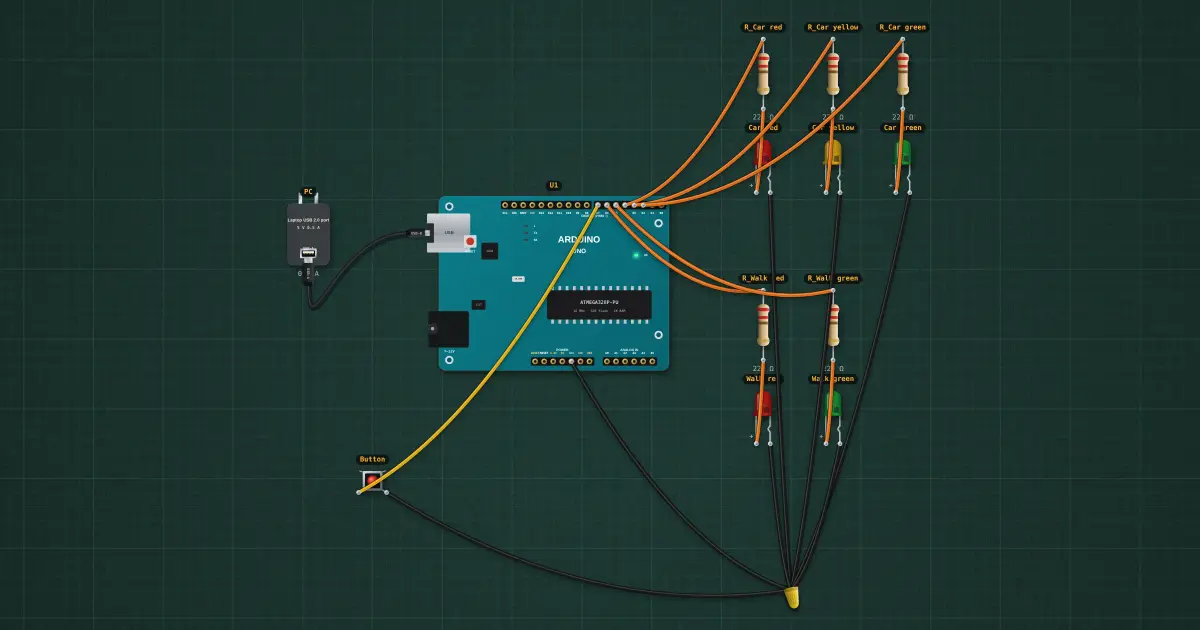
Build it in the labGuided build, test sheet and fault finding, free in your browser.
Parts list
Test procedure
Each test has an expected value and a pass range, like a factory test sheet:
- Cars green while nobody waits
- The button starts the crossing
- Back to green after the walk
- Never green for both
How it works
What it does: Cars green until someone presses the button; yellow, then walk, then a flashing walk light, then green again.
Build it (guided or ready-made), then run its test procedure below. Every test has an expected value and a pass range, just like a factory test sheet.
Things to try
- Press the button straight after the lights turn green: the cars still get their 5 s.
- Change the 5000 in the WALK state to 10000 and upload: a longer crossing for a wide road.
- Add a buzzer on a free pin that ticks while the walk light is on, like real crossings for the blind.
Background
The first electric traffic light (Cleveland, 1914) was switched by hand; push-button "pelican" crossings came in the 1960s.