SG90 hobby servo with Arduino Uno
How to connect an SG90 hobby servo to an Arduino Uno: the wiring, a sketch that works, and a simulator to try it in your browser before you build it.
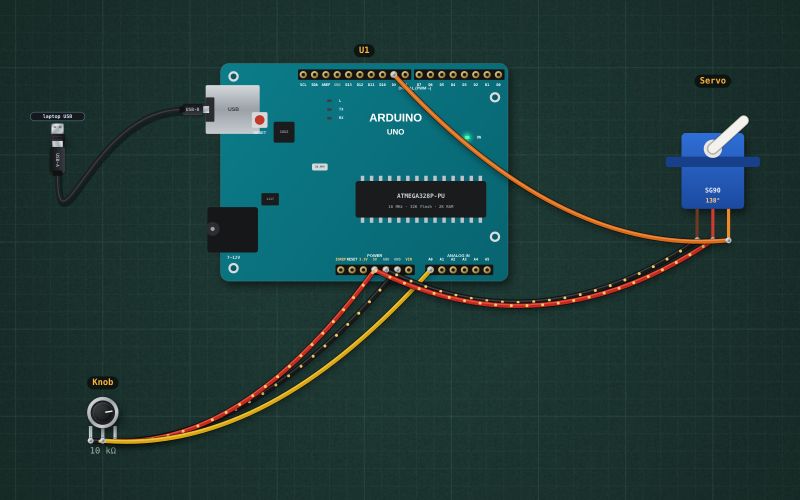
SG90 micro servo · 4.8–6 V · 50 Hz pulses: 0.5 ms = 0°, 1.5 ms = 90°, 2.5 ms = 180° · ~10 mA holding, 150–250 mA while moving
Wiring
| SG90 hobby servo pin | Arduino Uno |
|---|---|
| GND (brown) | GND |
| +5 V (red) | 5V |
| Signal (orange) | D9 ~ |
A small SG90 can run from the board's 5 V on USB; a bigger servo, or one that resets the board when it moves, needs its own 5 V supply with the grounds joined.
Run it in the labFree, no account needed. The same wiring, with the sketch already on the board.
Code
From the project Arduino servo that follows a knob. It also compiles in the Arduino IDE with the libraries it includes.
// Servo follows a knob: a 10 kΩ pot on A0 sets the angle of a hobby servo on D9 (0 to 180°).
#include <Servo.h>
Servo arm;
int lastAngle = -1;

void setup() {
  Serial.begin(9600);
  arm.attach(9);
}

void loop() {
  int angle = map(analogRead(A0), 0, 1023, 0, 180);
  if (abs(angle - lastAngle) > 1) {          // ignore 1° of jitter from the pot
    arm.write(angle); lastAngle = angle;
    Serial.print("Angle "); Serial.println(angle);
  }
  delay(15);
}
Also used in
For teachers
The project runs in the browser on a laptop or a phone, so every student can build and test it before the class touches a real board. Assign it on the teacher's page and set what counts as done: a prediction, a hidden fault found, or a passing test sheet.