PCB layout: route the board and run it
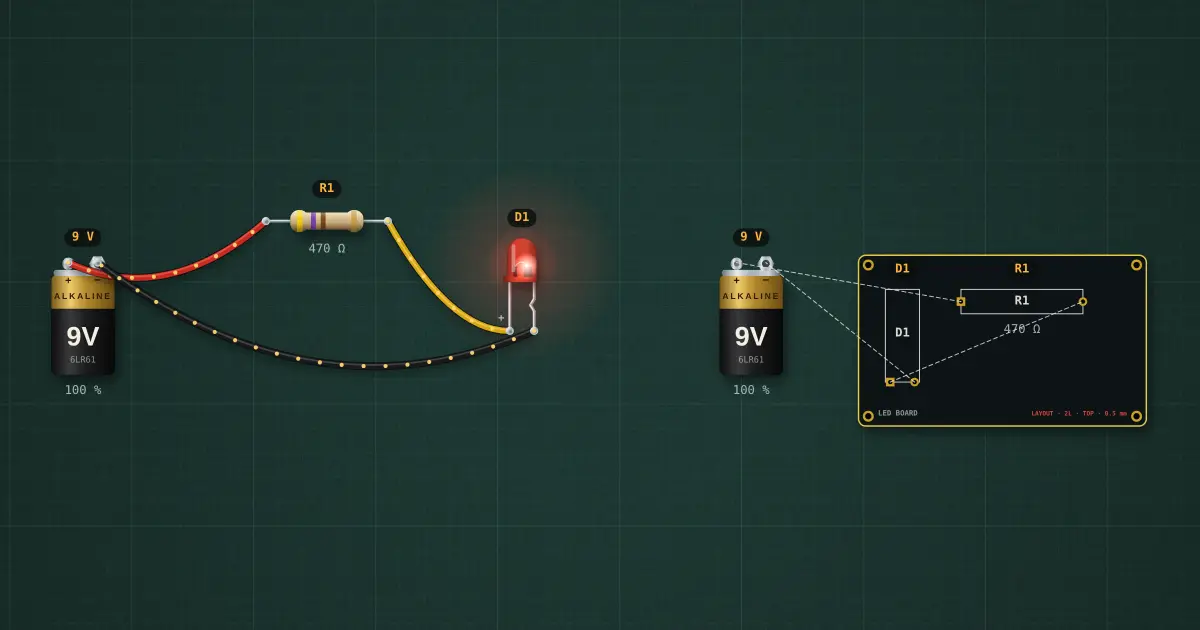
Schematic → layout → simulate. The circuit on the left is the schematic: a 9 V battery, a 470 Ω resistor and a red LED. The board on the right was made from it: the parts are placed as footprints, and the dashed ratsnest shows each connection still to make. Route the traces, and the board runs on the same solver: the LED on the board carries exactly the current of the one in the schematic.
Open this lesson in the labFree, in your browser, no account needed.
How it works
Route: drag from a pad to the pad its dashed line points at. The trace goes on the active layer (top = red, bottom = blue) at the board's trace width; pick both on the board's inspector. Drag the middle of a trace to bend it.
Off-board parts (the battery) connect with ordinary wires, the way a real board takes power through a connector.
DRC (design-rule check) on the board's inspector lists unrouted nets, shorts (two nets touching: traces crossing on the same layer, or a trace across another net's pad), clearance under 0.2 mm, and traces too narrow for the current they carry (IPC-2221, +10 °C).
Try it on the bench
- Route R1 → D1 on the top and D1 → the battery on the bottom: both layers work, because through-hole pads go through the board.
- Cross two traces of different nets on the same layer: DRC reports a short and the LED misbehaves. Move one to the other layer.
- Set the trace width to 0.2 mm and the battery to a bench supply at 3 A load: DRC flags the width.
Parts on the bench
- 2 × 9 V battery
- 2 × Resistor
- 2 × LED
- Printed circuit board
In the course
Zen’s Electronics Design Mastery, module “Fabrication — Perfboard & PCB”.