Perfboard: make every connection yourself
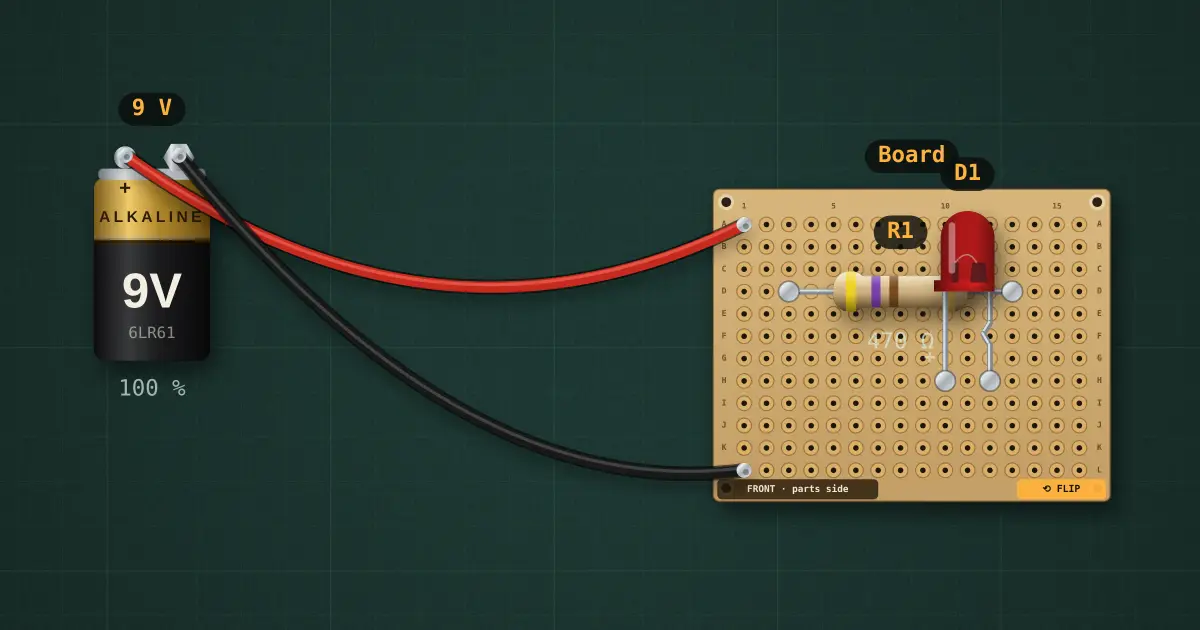
A breadboard joins each 5-hole strip for you. A perfboard joins nothing: every hole is its own island until you solder it. Here a resistor and an LED sit on the front and a 9 V battery is wired to two pads. The LED stays dark until you flip the board and route the back.
Open this lesson in the labFree, in your browser, no account needed.
How it works
Net rule: two holes are the same node only if a solder bridge, a wire or the same component lead joins them. Being next to each other means nothing.
Route it: flip the board (F, or the FLIP tab), then drag pad to pad. Neighbouring pads get a solder bridge, short straight runs a bare tinned jumper, longer runs insulated hook-up wire.
A path that works: A1 → D3 (battery + to R1), D13 → H10 (R1 to the LED anode, the lead on the left from the front), H12 → L1 (LED cathode to battery −). On the back everything is mirrored, so the same holes sit on the other side.
Turn on the continuity probe and click a pad: every pad joined to it lights up. That is how you check a net before you apply power.
Try it on the bench
- Before routing, measure across the resistor: no current, because nothing reaches its leads.
- Route it, then drag the LED one hole to the right on the front: its leads leave the routed holes and it goes dark again.
- Add a solder bridge between two neighbouring pads that should not be joined and watch the probe show the short.
Parts on the bench
In the course
Zen’s Electronics Design Mastery, module “Fabrication — Perfboard & PCB”.