Active buzzer with Arduino Uno
How to connect an Active buzzer to an Arduino Uno: the wiring, a sketch that works, and a simulator to try it in your browser before you build it.
Magnetic 12 mm · 3–12 V · ~2.3 kHz
Wiring
| Active buzzer pin | Arduino Uno |
|---|---|
| pin 1 | D8 |
| pin 2 | GND |
Run it in the labFree, no account needed. The same wiring, with the sketch already on the board.
Code
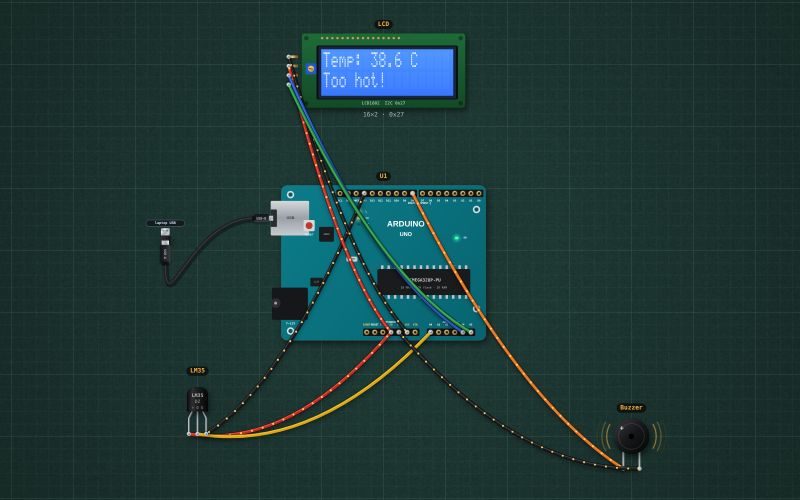
From the project Arduino thermometer with an alarm: LM35, LCD and buzzer. It also compiles in the Arduino IDE with the libraries it includes.
// Thermometer with an alarm: an LM35 on A0 (10 mV per °C), the reading on a 16×2 I2C LCD, an active buzzer on D8 above 35 °C.
#include <Wire.h>
#include <LiquidCrystal_I2C.h>
LiquidCrystal_I2C lcd(0x27, 16, 2);
const int SENSOR = A0, BUZZER = 8;
const float ALARM_C = 35.0;

void setup() {
  Serial.begin(9600);
  pinMode(BUZZER, OUTPUT);
  lcd.init(); lcd.backlight();
}

void loop() {
  float c = analogRead(SENSOR) * 500.0 / 1023.0;      // 5 V reference: 1023 = 500 °C worth of 10 mV
  bool hot = c >= ALARM_C;
  digitalWrite(BUZZER, hot ? HIGH : LOW);
  lcd.setCursor(0, 0); lcd.print("Temp: "); lcd.print(c, 1); lcd.print(" C   ");
  lcd.setCursor(0, 1); lcd.print(hot ? "Too hot!        " : "OK              ");
  Serial.print(c, 1); Serial.println(" C");
  delay(500);
}
Also used in
- Arduino reaction-time game on an I²C LCD
- Arduino Simon memory game: four LEDs, four buttons, a buzzer
- Arduino parking sensor: HC-SR04, three LEDs and a beeper
- Arduino keypad door lock: 4×4 keypad, servo bolt and LCD
- Arduino motion alarm: PIR sensor, siren and arm button
- Reaction-time game
- Simon memory game
- Ultrasonic parking sensor
- Keypad door lock
For teachers
The project runs in the browser on a laptop or a phone, so every student can build and test it before the class touches a real board. Assign it on the teacher's page and set what counts as done: a prediction, a hidden fault found, or a passing test sheet.