BME280 environment sensor with ESP32
How to connect a BME280 environment sensor to an ESP32: the wiring, a sketch that works, and a simulator to try it in your browser before you build it.
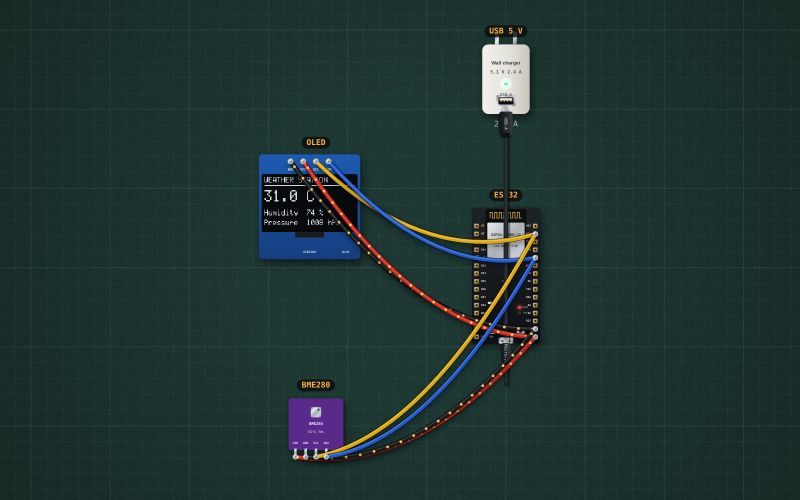
BME280 breakout · temperature ±1 °C, humidity ±3 %, pressure ±1 hPa · I²C at 0x76 · 3.3 V
Wiring
| BME280 environment sensor pin | ESP32 |
|---|---|
| VIN | 3V3 |
| GND | GND |
| SCL | GPIO22 |
| SDA | GPIO21 |
Many BME280 boards answer at 0x76, others (Adafruit's) at 0x77. A BMP280 looks the same but has no humidity.
Run it in the labFree, no account needed. The same wiring, with the sketch already on the board.
Code
From the project ESP32 weather station: BME280 on an OLED. It also compiles in the Arduino IDE (ESP32 core 3.x) with the libraries it includes.
// Weather station: a BME280 (temperature, humidity, pressure) and a 0.96" OLED on the same I2C bus.
// SDA -> GPIO21, SCL -> GPIO22. BME280 at 0x76, OLED at 0x3C.
#include <Wire.h>
#include <Adafruit_GFX.h>
#include <Adafruit_SSD1306.h>
#include <Adafruit_BME280.h>

Adafruit_SSD1306 display(128, 64, &Wire, -1);
Adafruit_BME280 bme;

void setup() {
  Serial.begin(115200);
  Wire.begin();
  Wire.setClock(400000);
  if (!display.begin(SSD1306_SWITCHCAPVCC, 0x3C)) Serial.println("No OLED at 0x3C");
  if (!bme.begin(0x76)) Serial.println("No BME280 at 0x76: check the wiring");
}

void loop() {
  float t = bme.readTemperature();
  float h = bme.readHumidity();
  float p = bme.readPressure() / 100.0;   // Pa -> hPa
  Serial.print(t); Serial.print(" C  "); Serial.print(h); Serial.print(" %  "); Serial.print(p); Serial.println(" hPa");

  display.clearDisplay();
  display.setTextColor(SSD1306_WHITE);
  display.setTextSize(1);
  display.setCursor(0, 0);
  display.println("WEATHER STATION");
  display.drawLine(0, 10, 127, 10, SSD1306_WHITE);
  display.setTextSize(2);
  display.setCursor(0, 16);
  display.print(t, 1); display.print(" C");
  display.setTextSize(1);
  display.setCursor(0, 40);
  display.print("Humidity  "); display.print(h, 0); display.println(" %");
  display.setCursor(0, 52);
  display.print("Pressure  "); display.print(p, 0); display.println(" hPa");
  display.display();
  delay(1000);
}
Also used in
For teachers
The project runs in the browser on a laptop or a phone, so every student can build and test it before the class touches a real board. Assign it on the teacher's page and set what counts as done: a prediction, a hidden fault found, or a passing test sheet.