L298N motor driver with Arduino Nano
How to connect an L298N motor driver to an Arduino Nano: the wiring, a sketch that works, and a simulator to try it in your browser before you build it.
L298N dual H-bridge module · 5–35 V motor supply · 2 A per channel (bipolar Darlington outputs: about 2 V lost at 1 A) · 78M05 regulator fitted (jumper on: +5V is an output, keep V_S ≤ 12 V) · ENA jumper on (always enabled) · ENB jumper on
Wiring
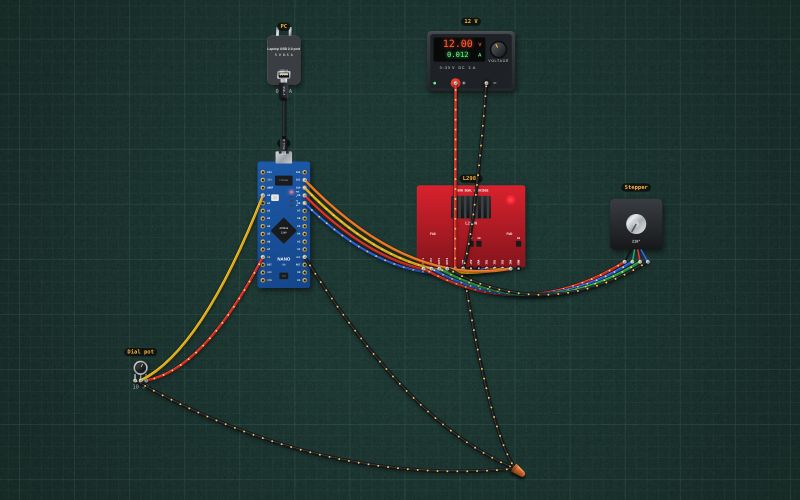
| L298N motor driver pin | Arduino Nano |
|---|---|
| +12V | + of the 12 V supply |
| GND | GND |
| IN1 | D8 |
| IN2 | D9 ~ |
| IN3 | D10 ~ |
| IN4 | D11 ~ |
The L298N suits a 12 V, about 0.4 A stepper or a small DC motor. For the common 1.5–2 A NEMA 17 steppers use an A4988 or DRV8825 with its current limit set.
Run it in the labFree, no account needed. The same wiring, with the sketch already on the board.
Code
From the project Arduino stepper that follows a dial: pot, L298N and a NEMA 17. It also compiles in the Arduino IDE with the libraries it includes.
// Stepper dial: the pot sets the angle (0-360°) and a NEMA 17 follows it.
// Pot wiper A0. L298N IN1..IN4 on D8..D11 (ENA and ENB jumpers on). 200 full steps per turn (1.8° each).
const int IN[4] = {8, 9, 10, 11};
const int SEQ[4][4] = {{1,0,1,0}, {0,1,1,0}, {0,1,0,1}, {1,0,0,1}};   // coil A, then coil B, each reversed in turn
const long STEPS_PER_TURN = 200;
long pos = 0;
unsigned long lastStep = 0, lastPrint = 0;

void coils(int s) { for (int i = 0; i < 4; i++) digitalWrite(IN[i], SEQ[s][i]); }
void release() { for (int i = 0; i < 4; i++) digitalWrite(IN[i], LOW); }    // both bridges off when parked

void setup() {
  Serial.begin(9600);
  for (int i = 0; i < 4; i++) pinMode(IN[i], OUTPUT);
  coils(0);                                                     // the rotor snaps to step 0
}

void loop() {
  unsigned long now = millis();
  long target = (long)analogRead(A0) * STEPS_PER_TURN / 1024;
  if (target != pos && now - lastStep >= 30) {                  // 30 ms a step: 10 RPM
    pos += (target > pos) ? 1 : -1;
    coils(((pos % 4) + 4) % 4);
    lastStep = now;
  } else if (target == pos && now - lastStep > 500) {
    release();                                                  // half a second after arriving: coils off, no heat
  }
  if (now - lastPrint > 250) {
    lastPrint = now;
    Serial.print("target "); Serial.print(target * 360 / STEPS_PER_TURN);
    Serial.print("°  at "); Serial.print(pos * 360 / STEPS_PER_TURN); Serial.println("°");
  }
}
Also used in
For teachers
The project runs in the browser on a laptop or a phone, so every student can build and test it before the class touches a real board. Assign it on the teacher's page and set what counts as done: a prediction, a hidden fault found, or a passing test sheet.