2. Adding a switch
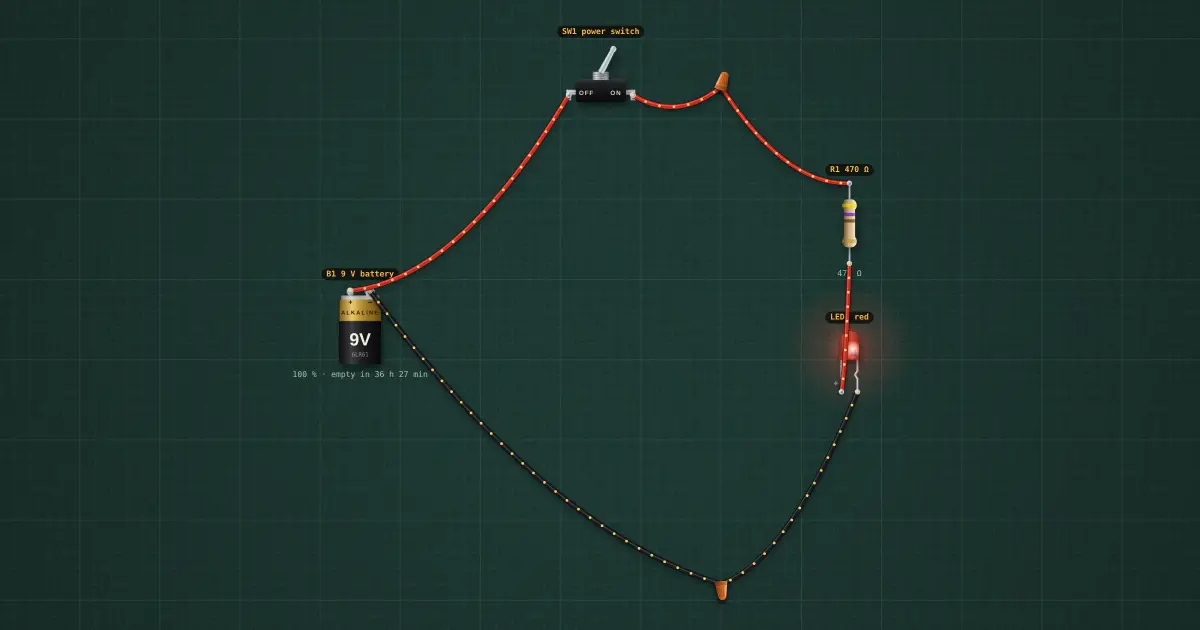
Step 2 of the automatic light: SW1 goes between B1 + and R1. Off: the LED is dark and no current flows. Component 2 of 14: the switch. A switch is a deliberate break in the circuit. SPST (one pole, one throw) just opens or closes one wire. It goes in the + supply line, before everything else, so that when it is off nothing downstream is live.
Build it in the labGuided build, test sheet and fault finding, free in your browser.
Parts list
Test procedure
Each test has an expected value and a pass range, like a factory test sheet:
- Switch on: LED lit
- Switch off: no current
How it works
The switch. A switch is a deliberate break in the circuit. SPST (one pole, one throw) just opens or closes one wire. It goes in the + supply line, before everything else, so that when it is off nothing downstream is live.
Reading it. Ratings are printed or moulded on it: current and voltage (e.g. 6 A 125 V AC). A switch rated for AC can carry less DC (the arc does not go out by itself), so check the DC rating for battery work.
Testing it. Meter on continuity: beeps when on, silent when off. In circuit, with the switch off you should read the full supply across its two terminals; with it on, almost zero.
In the build. SW1 goes between B1 + and R1. Off: the LED is dark and no current flows.
Builds on lesson 1: everything from before is still there.
Next: lesson 3, potentiometer.
Things to try
- Click SW1 to switch it off and on.
- Put the meter (V) across SW1 while it is off: you see the whole 9 V across the gap.
Background
One circuit, built up one part at a time: by lesson 14 it is a solar-powered, dusk-sensing, motion-triggered timed lamp with an alarm.