Single 18650 charger with a 3-LED charge indicator (green 80–100 %, yellow 40–79 %, red below 40 %)
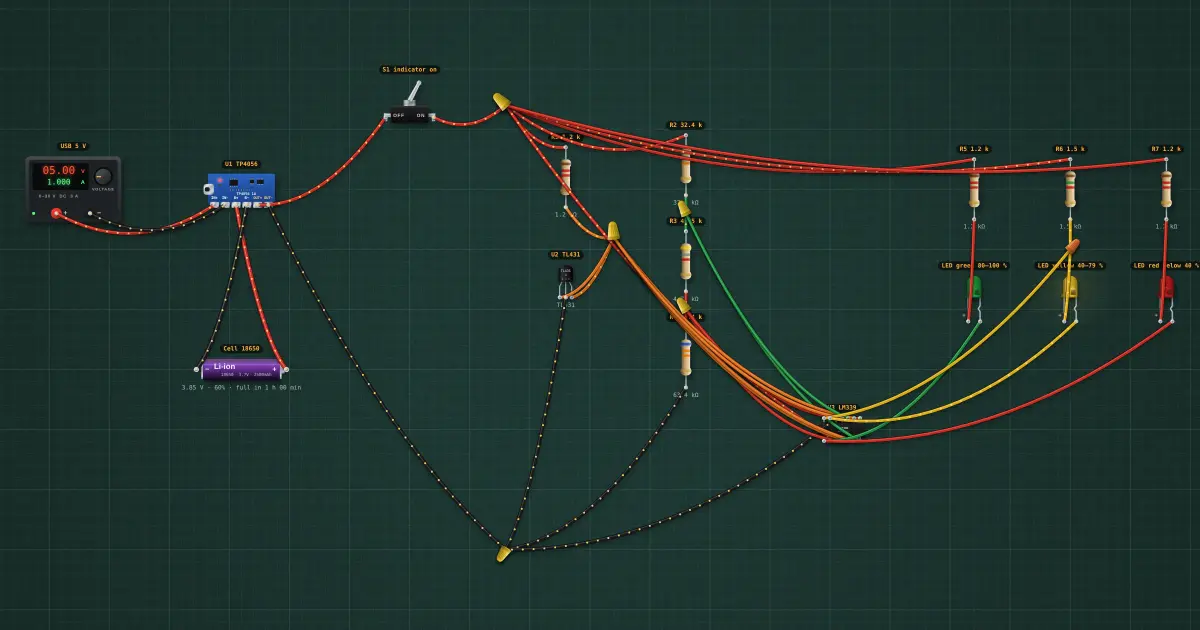
Charges an 18650 from USB and shows its charge on three LEDs: green 80–100 %, yellow 40–79 %, red below 40 %. Charge one 18650 from USB and see how full it is at a glance. U1, a TP4056 module, charges the cell at 1 A to 4.2 V (CC/CV) and protects it (DW01: over-discharge, over-current, short circuit); its own red/blue LEDs still mean “charging / full”. The indicator runs from the module’s protected OUT, so the protection also guards the cell against the indicator’s small drain. U2, a TL431 wired as a 2.495 V reference (REF tied to K, R1 1.2 k gives it about 1 mA at the thresholds), is the yardstick. R2/R3/R4 (32.4 k / 4.75 k / 63.4 k, 1 % parts) divide the cell voltage into two taps: tap A reaches 2.495 V when the cell is at 3.96 V (80 % on a resting Li-ion cell), tap B when it is at 3.68 V (40 %). U3, an LM339, compares the taps with the reference. Its outputs are open-collector: each can only pull down, which is exactly what an LED needs. C1 sinks the green LED above 80 %. C2 sinks the red LED below 40 %. The yellow LED needs “above 40 % AND below 80 %”: C4 gives it a return path above 40 %, and C3 shorts its anode to ground above 80 %, so it only lights in between. Exactly one LED is lit. Read it at rest: while charging, the cell sits about 0.05–0.1 V above its resting voltage, so the indicator runs a little ahead; after charging it settles back within a few minutes. S1 switches the indicator off (it draws about 4–7 mA, which would empty a 3000 mAh cell in about three weeks; the LEDs run at 1–2 mA, plenty for modern LEDs indoors); a push button in its place gives “press to check”.
Build it in the labGuided build, test sheet and fault finding, free in your browser.
Parts list
- Bench power supply
- TP4056 charger module
- 18650 Li-ion cell
- Toggle switch
- 7 × Resistor
- TL431 reference
- LM339 quad comparator
- 3 × LED
Test procedure
Each test has an expected value and a pass range, like a factory test sheet:
- 90 %, resting: green only
- 82 %: still green
- 78 %: yellow
- 60 %: yellow only
- 42 %: still yellow
- 38 %: red
- 10 %: red only
- Reference
- Indicator draw at 100 % (the most)
- USB in: the TP4056 charges at 1 A
How it works
What it does: Charges an 18650 from USB and shows its charge on three LEDs: green 80–100 %, yellow 40–79 %, red below 40 %.
Build it (guided or ready-made), then run its test procedure below. Every test has an expected value and a pass range, just like a factory test sheet.
Things to try
- Click the cell and drag its charge from 100 % down to 0 %: green → yellow → red.
- Plug in USB (set the supply to 5 V) at 75 % and watch the indicator move up as it charges.
- Switch S1 off: the indicator goes dark and stops drawing current.
Background
The same window-comparator idea is inside every 3- and 4-LED battery-level board; the cheap ones use a dedicated chip, but it is four comparators and a reference underneath.