Blink: your first sketch
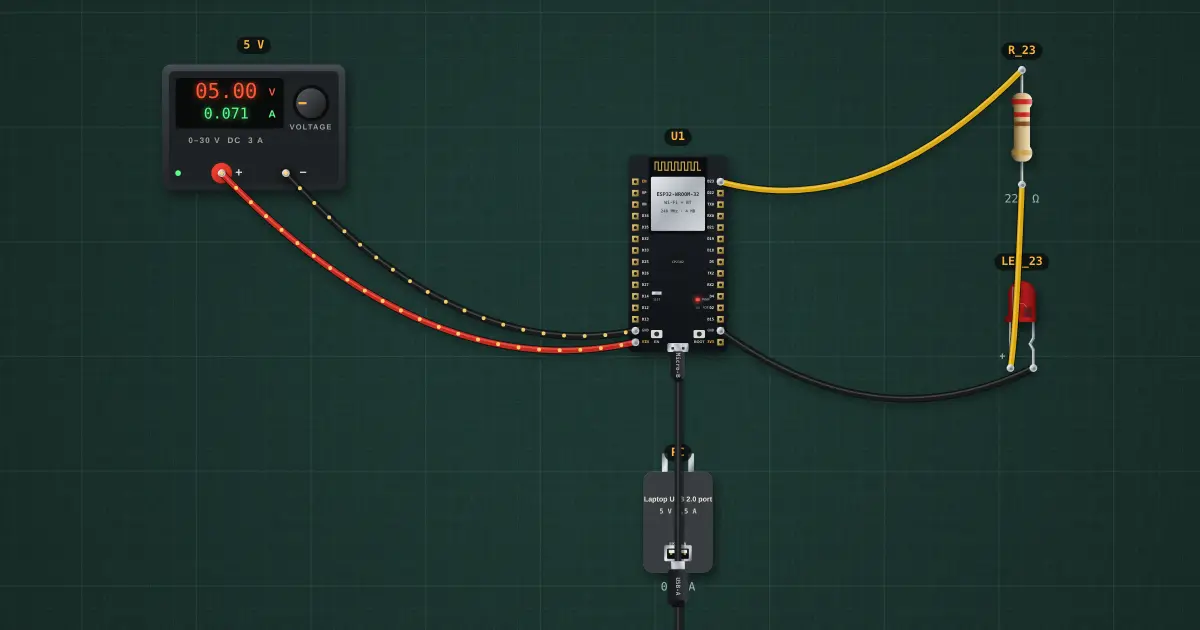
Every microcontroller course starts here: setup() runs once, loop() runs forever. digitalWrite() switches a pin between 0 V and 3.3 V, and delay() waits. The onboard blue LED (GPIO2) and an external LED on GPIO23 blink together.
Open this lesson in the labFree, in your browser, no account needed.
How it works
GPIO23 HIGH = 3.3 V. The LED drops about 1.9 V, so the 220 Ω resistor plus about 33 Ω inside the pin driver set I = (3.3 − 1.9) ÷ 253 ≈ 5.5 mA.
At its default drive strength an ESP32 pin is meant for about 20 mA; 40 mA is the most it gives at full drive (WROOM-32 datasheet). Keep LEDs at a few milliamps.
The 500 ms delays make a 1 Hz blink: 500 ms on, 500 ms off.
Try it on the bench
- Select U1 → Open in Arduino IDE, change both delays to 100 and upload: it blinks five times faster.
- Change the resistor to 1 kΩ: dimmer, about 1.4 mA.
- Move the LED wire from GPIO23 to GPIO22: it stops, until you change the pin number in the sketch too.
Parts on the bench
- Bench power supply
- ESP32 DevKit
- USB charger / port
- Resistor
- LED
In the course
Zen’s Electronics Design Mastery, module “Microcontrollers & Embedded”.