USB-to-serial adapter (CP2102)
CH340G USB-to-TTL module · logic 5 V (jumper) · 115200 baud in the monitor
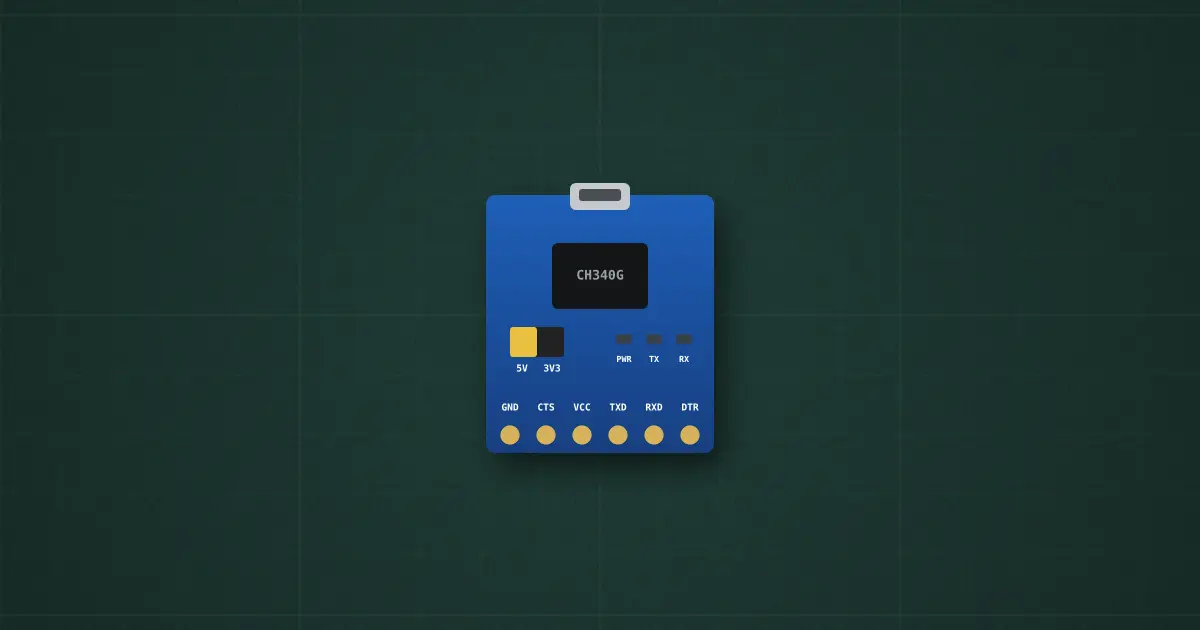
Try it on the benchThe lab drops it on an empty bench and opens its datasheet card.
Typical part: USB-to-TTL serial module: WCH CH340G or Silicon Labs CP2102, 6-pin header (FTDI order)
Pins
- GND
- CTS (input)
- VCC (out: 5 V or 3.3 V, per the jumper)
- TXD (out → the device’s RX)
- RXD (in ← the device’s TX)
- DTR (out)
- USB port (to a computer)
Ratings and limits
| What it is | a USB device that the computer sees as a COM port; the other side is a TTL UART (idle high, 8N1), 300 baud to 2 Mbaud |
|---|---|
| Logic level | set by the jumper: 5 V or 3.3 V. On 5 V, TXD swings to 5 V: too much for an ESP32 or a 3.3 V modem RX. Check the jumper before wiring |
| VCC pin | 5 V straight from USB (the computer allows 500 mA) or 3.3 V from the chip’s regulator (about 100 mA): not enough for a modem’s 2 A GSM bursts |
| Wiring | TXD → the device’s RX, RXD ← the device’s TX (crossed), GND to GND. TX-to-TX gives silence |
| DTR / RTS | handshake outputs; through a 100 nF capacitor DTR resets an Arduino for uploads; ESP boards use DTR+RTS for EN and IO0 |
| Driver | CH340 driver (Windows/macOS may need it installed); CP210x driver (built into most systems) |
How to use it
The first tool for any serial part: open the monitor on the adapter and type AT commands to a modem, or watch a GPS’s NMEA sentences, with no microcontroller in between.
More in usb & power interfaces
- USB charger / port
- USB-C PD charger
- USB-C PD source controller
- Synchronous buck converter IC
- USB-C PD trigger + meter
- Smartphone
- USB-C breakout
- Current-mode PWM controller
- Flyback transformer
- High-voltage N-MOSFET
Sources: WCH CH340 datasheet (CH340DS1); Silicon Labs CP2102N datasheet; typical module schematics (logic-level jumper, LEDs).