OLED display with ESP32
How to connect an OLED display to an ESP32: the wiring, a sketch that works, and a simulator to try it in your browser before you build it.
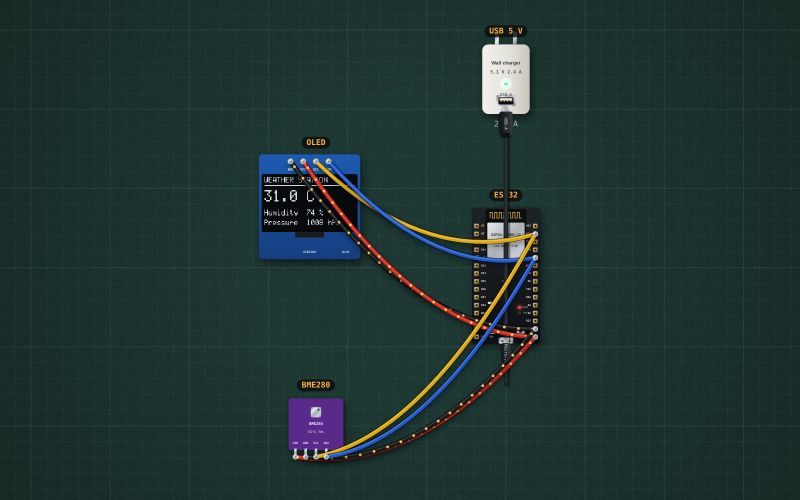
0.96" 128×64, white · SSD1306 · I²C 0x3C
Wiring
| OLED display pin | ESP32 |
|---|---|
| GND | GND |
| VCC (3.3–5 V: regulator on the module) | 3V3 |
| SCL | GPIO22 |
| SDA | GPIO21 |
Most 0.96" OLEDs answer at 0x3C (some at 0x3D). SDA and SCL can share the bus with other I²C sensors.
Run it in the labFree, no account needed. The same wiring, with the sketch already on the board.
Code
From the project ESP32 weather station: BME280 on an OLED. It also compiles in the Arduino IDE (ESP32 core 3.x) with the libraries it includes.
// Weather station: a BME280 (temperature, humidity, pressure) and a 0.96" OLED on the same I2C bus.
// SDA -> GPIO21, SCL -> GPIO22. BME280 at 0x76, OLED at 0x3C.
#include <Wire.h>
#include <Adafruit_GFX.h>
#include <Adafruit_SSD1306.h>
#include <Adafruit_BME280.h>

Adafruit_SSD1306 display(128, 64, &Wire, -1);
Adafruit_BME280 bme;

void setup() {
  Serial.begin(115200);
  Wire.begin();
  Wire.setClock(400000);
  if (!display.begin(SSD1306_SWITCHCAPVCC, 0x3C)) Serial.println("No OLED at 0x3C");
  if (!bme.begin(0x76)) Serial.println("No BME280 at 0x76: check the wiring");
}

void loop() {
  float t = bme.readTemperature();
  float h = bme.readHumidity();
  float p = bme.readPressure() / 100.0;   // Pa -> hPa
  Serial.print(t); Serial.print(" C  "); Serial.print(h); Serial.print(" %  "); Serial.print(p); Serial.println(" hPa");

  display.clearDisplay();
  display.setTextColor(SSD1306_WHITE);
  display.setTextSize(1);
  display.setCursor(0, 0);
  display.println("WEATHER STATION");
  display.drawLine(0, 10, 127, 10, SSD1306_WHITE);
  display.setTextSize(2);
  display.setCursor(0, 16);
  display.print(t, 1); display.print(" C");
  display.setTextSize(1);
  display.setCursor(0, 40);
  display.print("Humidity  "); display.print(h, 0); display.println(" %");
  display.setCursor(0, 52);
  display.print("Pressure  "); display.print(p, 0); display.println(" hPa");
  display.display();
  delay(1000);
}
Also used in
- ESP32 weather station with a comfort word: BME280 and OLED
- ESP32 kitchen scale: HX711, load cell and OLED
- ESP32 DC power meter: INA219 and OLED
- ESP32 thermocouple thermometer with an alarm: MAX6675 and OLED
- ESP32 water tank level meter: HC-SR04 and OLED
- Weather station on an OLED
For teachers
The project runs in the browser on a laptop or a phone, so every student can build and test it before the class touches a real board. Assign it on the teacher's page and set what counts as done: a prediction, a hidden fault found, or a passing test sheet.