Phone charging: volts, amps and watts
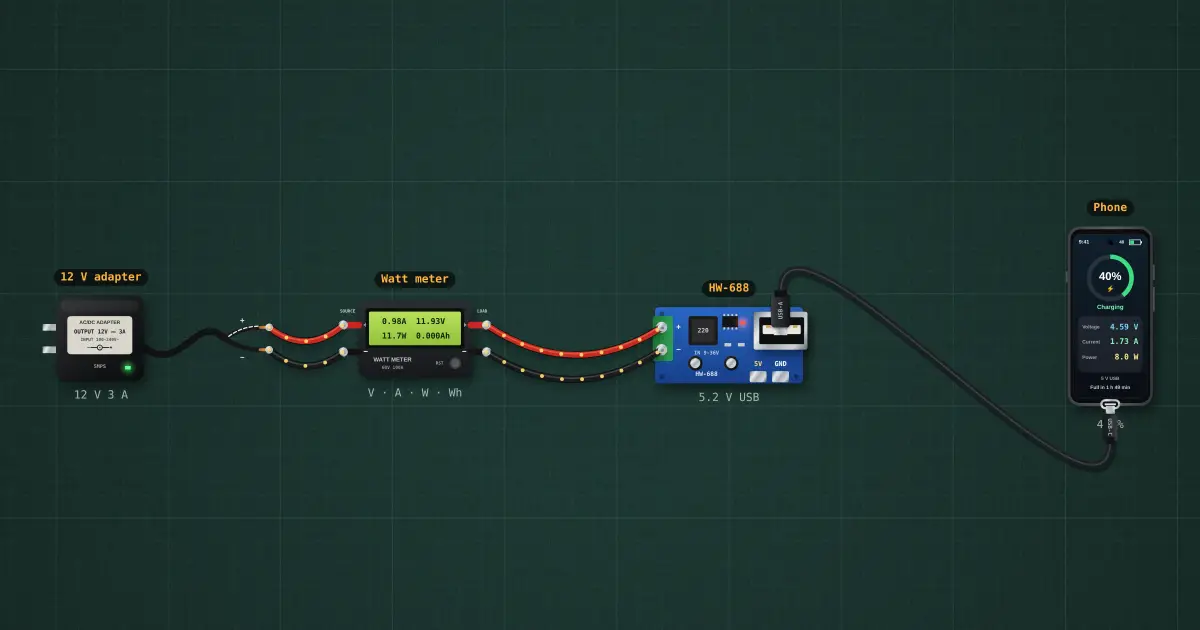
A phone shows the volts and amps it measures at its own USB port. A DC watt meter on the 12 V side shows what goes in. The difference is lost in the 12 V → 5 V converter and in the USB cable: watts in = watts out + losses.
Open this lesson in the labFree, in your browser, no account needed.
How it works
Watt meter (12 V side): P = V × I = 0 V × 0 A = 0 W
Phone screen (5 V side, after the cable): 0 V × 0 A = 0 W
Converter + cable efficiency = 0 W ÷ 0 W = —. Into the battery: about 0 W, so the phone itself loses another 0 W as heat.
The phone takes 2 A at most from a wall-charger port, so it shows 2 A × the voltage left after the cable: 0 W, not the 10 W printed on a “5 V 2 A” label. The current on the 12 V side is lower than on the 5 V side, because the power is the same and the voltage is higher.
Try it on the bench
- Select the USB cable and change it to 28 AWG, 2 m: the phone sees VBUS sag, its AICL cuts the current and the screen shows fewer watts.
- Delete the HW-688 and plug the phone into a USB-C PD charger with a C → C cable: it fast-charges at 9 V and about 18 W.
- Click the watt meter screen to see Wh and the peak current. Click RST to zero it.
- Set the phone’s battery to 85 %: charging moves to constant voltage and the current tapers off.
Parts on the bench
In the course
Zen’s Electronics Design Mastery, module “Capstone — Connected Tracker”.