Detecting USB plug-in with an ESP32
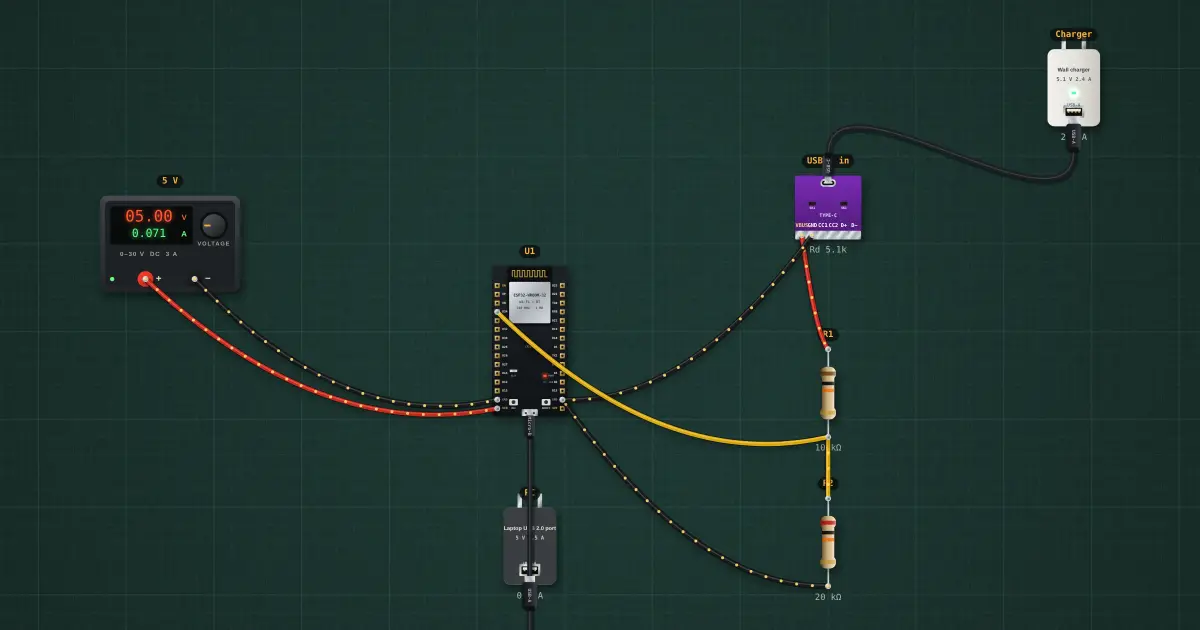
A device knows a cable was plugged in by watching VBUS. Divide the 5 V down to a safe level for a 3.3 V GPIO and attach an interrupt: every insertion and removal becomes an event your code can react to (start charging, show an icon, wake up).
Open this lesson in the labFree, in your browser, no account needed.
How it works
Divider: V_GPIO = 5 V × 20 k ÷ (10 k + 20 k) = 3.33 V, a solid HIGH that stays inside the 3.3 V limit. With no cable the 20 k pulls the pin to 0 V (LOW).
Grounds must be shared: the breakout’s GND goes to the ESP32’s GND, or the divider has no reference.
Try it on the bench
- Select the USB cable and press “Unplug and remove”: the serial monitor reports the removal at once.
- Drag a new cable from the charger’s USB-A port to the breakout’s USB-C port: “USB attached”.
- Replace the charger with a USB-C PD charger and a C → C cable, then set the breakout’s Rd to missing: no VBUS, no event, even though the cable is in.
Parts on the bench
- Bench power supply
- ESP32 DevKit
- 2 × USB charger / port
- USB-C breakout
- 2 × Resistor
In the course
Zen’s Electronics Design Mastery, module “Capstone — Connected Tracker”.