USB-C attach detection (CC, Rp and Rd)
A USB-C charger keeps VBUS switched off until something that wants power is plugged in. It pulls its CC pin up through Rp; a sink pulls CC down through a 5.1 kΩ Rd. The charger sees the resulting mid-level voltage on CC and only then turns on 5 V.
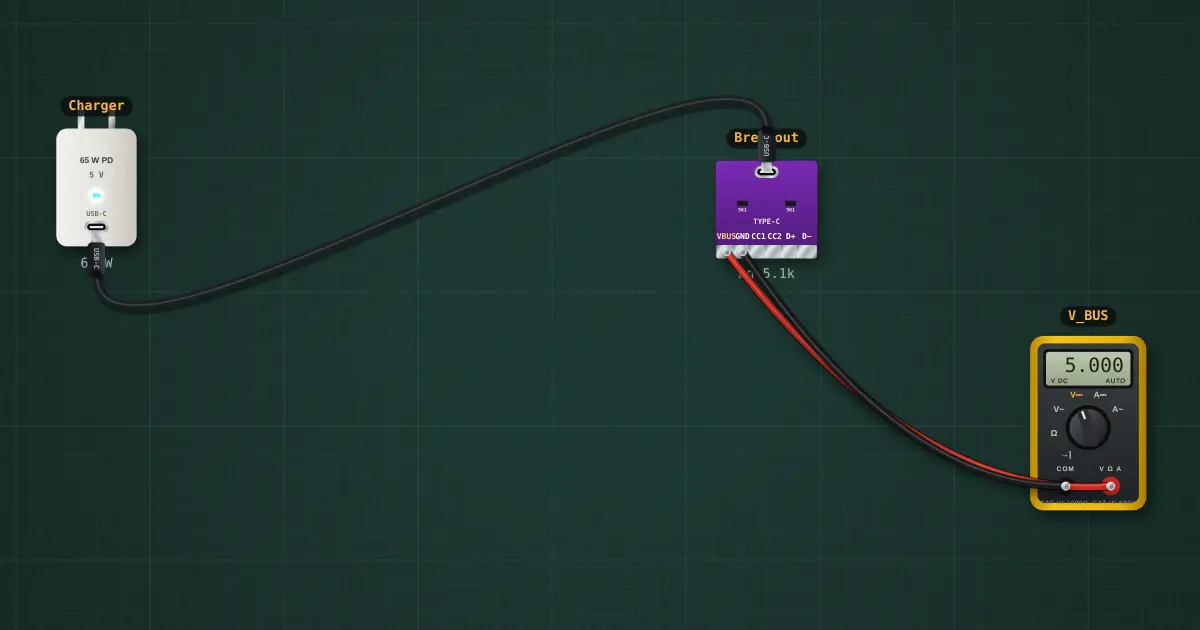
Open this lesson in the labFree, in your browser, no account needed.
How it works
Charger Rp = 10 kΩ to 5 V. Sink Rd = 5.1 kΩ to GND.
V_CC = 5 V × Rd ÷ (Rp + Rd) = 5 × 5.1 ÷ 15.1 = 1.69 V
The charger treats 0.8–2.6 V as “sink attached” and turns VBUS on after 100 ms; 5 V means nothing is there, so VBUS stays at 0 V. VBUS is off.
Try it on the bench
- Select the Breakout and set its Rd to “missing”: the charger never sees a sink, and VBUS stays at 0 V. This is the classic cheap USB-C board bug.
- Select the cable and flip it: CC moves from CC1 to CC2 and everything still works.
- Delete the cable, add a USB charger / port, and connect it to the breakout: a USB-A → C cable has a 56 kΩ Rp inside, and the USB-A side always has 5 V, so even the board without Rd gets power.
Parts on the bench
- USB-C PD charger
- USB-C breakout
- Digital multimeter
In the course
Zen’s Electronics Design Mastery, module “Capstone — Connected Tracker”.