Strapping pins: when the board will not boot
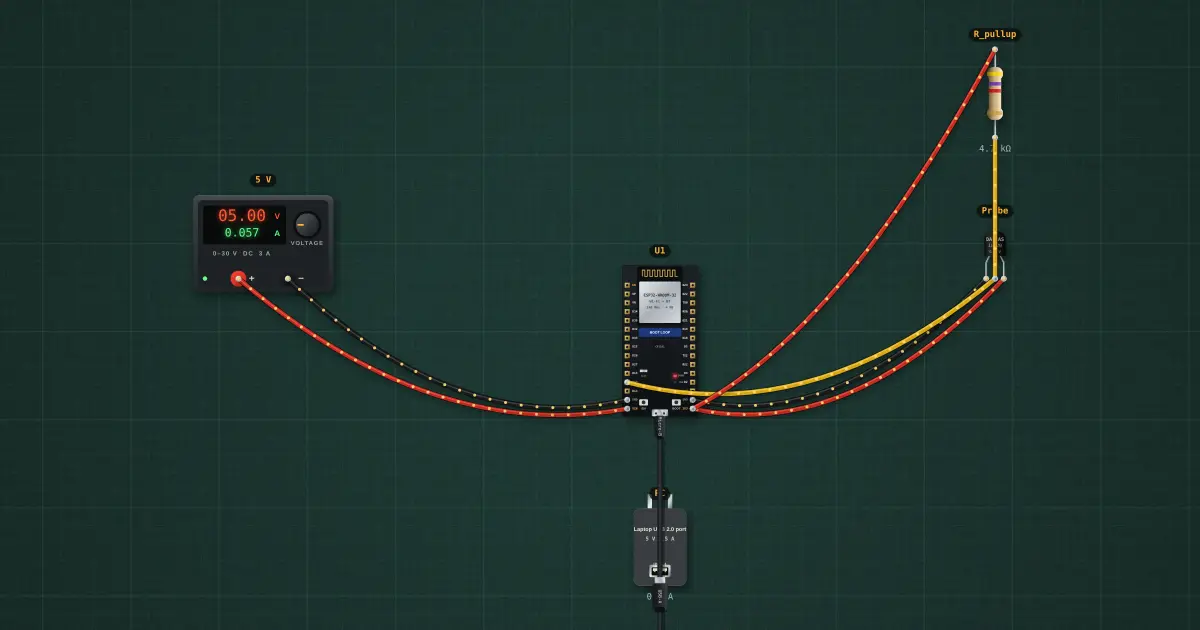
Five ESP32 pins are read once, as the chip leaves reset, to decide how it starts: GPIO0 (run your program, or wait for a download), GPIO2, GPIO5, GPIO12 (the flash voltage) and GPIO15 (boot messages on or off). Anything that pulls one of them the wrong way stops the board before your sketch runs. Here a DS18B20 probe and its 4.7 kΩ pull-up are on GPIO12.
Open this lesson in the labFree, in your browser, no account needed.
How it works
At reset GPIO12 has an internal pull-down of about 45 kΩ. The 4.7 kΩ pull-up beats it: the pin sits at 3.3 × 45k ÷ (45k + 4.7k) = 2.99 V, above the 0.75 × 3.3 = 2.48 V a HIGH needs.
GPIO12 (MTDI) HIGH tells the chip its flash runs at 1.8 V. The WROOM-32's flash is a 3.3 V part, so the ROM can't read it: flash read err, 1000, a watchdog reset, and the same again, forever.
The safe pins for pull-ups and sensors are the ones that are not straps: GPIO4, 13, 14, 16–19, 21–23, 25–27, 32, 33. GPIO34–39 are inputs only, without pulls.
Try it on the bench
- Select U1 and open the Serial Monitor: "flash read err, 1000", again and again.
- Try the variant: the same probe on GPIO4 boots and reads the temperature.
- Click BOOT on the board (it stays held), then EN: the chip now starts in download mode instead. Click BOOT again and press EN to let it run.
Parts on the bench
- Bench power supply
- ESP32 DevKit
- USB charger / port
- DS18B20 temperature sensor
- Resistor
In the course
Zen’s Electronics Design Mastery, module “Microcontrollers & Embedded”.