Send an SMS with the A7670 LTE module
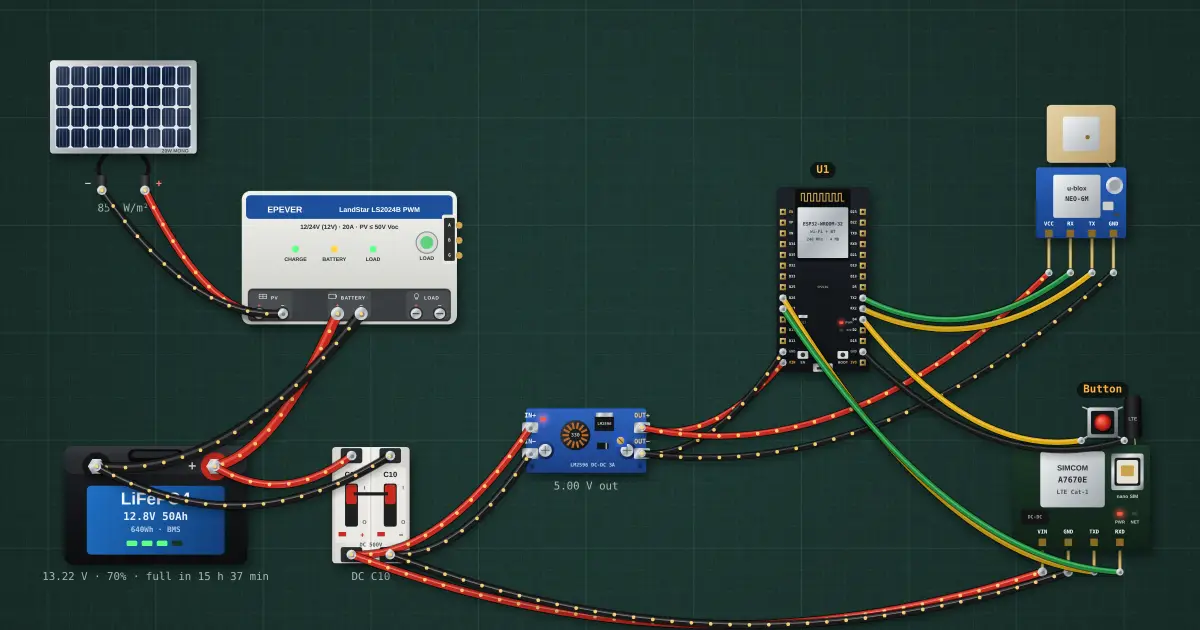
Cellular modules are driven by AT commands over a serial port. Press the button and the ESP32 tells the A7670 to send a text message: the basis of alarms and trackers where there is no Wi-Fi.
Open this lesson in the labFree, in your browser, no account needed.
How it works
AT+CMGF=1 selects text mode; AT+CMGS="number" then the message and Ctrl-Z sends it. Each command answers OK or ERROR.
The modem draws up to 2 A in bursts while transmitting, which is why it gets its own buck converter.
Try it on the bench
- Wait for “Press the button”, then click the button and watch the AT exchange in the serial monitor.
- Select the A7670 and set the signal to poor: sending takes longer or fails.
Parts on the bench
- Solar panel
- Solar charge controller
- LiFePO4 battery
- DC breaker
- Step-down converter
- ESP32 DevKit
- GPS module
- 4G LTE module
- Push button
In the course
Zen’s Electronics Design Mastery, module “Microcontrollers & Embedded”.