Handover, user orientation and maintenance
Hand a finished system over to its owner with the right documents and a clear explanation of how to use it, what to avoid and how to look after it. A stand-alone system lives or dies by how its owner uses it after you leave.
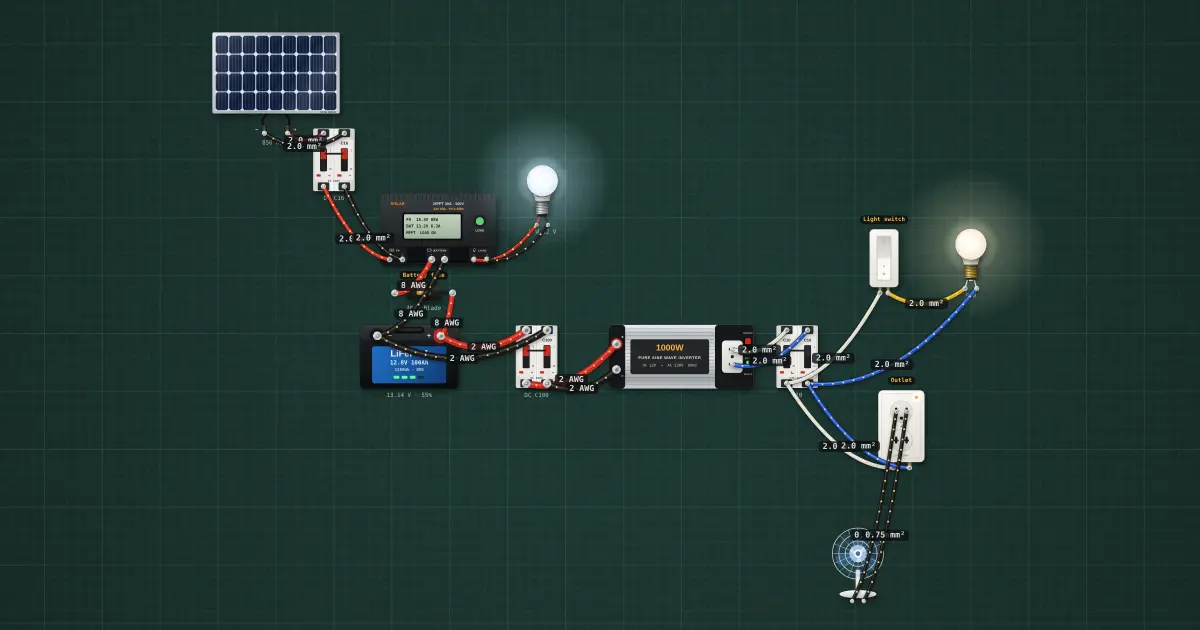
Open this lesson in the labFree, in your browser, no account needed.
How it works
Documents for the owner
Commissioning (covered in its own lesson) proves the system works and records the readings. At handover, give the owner a written report and a folder with:
- The commissioning report: the tests done, the readings, the date and who did them.
- The as-built single-line diagram and layout, with any changes from the design.
- The list of equipment with models and serial numbers.
- The manuals for the controller, battery, inverter and modules.
- The controller and inverter settings you used.
- The warranty documents and your contact details.
- A one-page guide to daily use, shutdown and maintenance in the owner's language.
Showing the owner
Walk the owner through the system, from the array to the loads, and let them do the switching themselves while you watch.
- How it works: the modules make power in daylight, the controller charges the battery, the battery runs the loads at night and in bad weather, and the inverter turns the battery's DC into 230 V AC for ordinary appliances.
- The controller's lights or screen: show what charging, full, low battery and load-off look like on this model, and where the fault codes are listed in the manual.
- How to switch off safely: loads first, then the inverter, then the breakers in the order on the label.
And what not to do:
- Do not add loads beyond what the system was designed for. A new refrigerator or a second fan can drain the battery every night.
- Do not disconnect the battery while the system is running, and never unplug a PV connector under load.
- Do not cover the vents of the controller, inverter or battery box, and do not store things on top of them.
- Do not let children play near the battery or the equipment.
- Do not open the equipment or change the settings.
The daily energy budget, in plain words
A stand-alone system has a daily energy budget, like a household budget for money. The array earns a certain amount each sunny day, the battery is the savings account, and every appliance spends. Energy is power times time, in watt-hours (Wh).
| Load | Power | Hours a day | Energy |
|---|---|---|---|
| 4 LED lamps | 4 × 9 W = 36 W | 5 h | 180 Wh |
| Desk fan | 50 W | 6 h | 300 Wh |
| Phone charging | 10 W | 3 h | 30 Wh |
| Total | 510 Wh |
Write the owner's budget in the same way, from the design. Explain that cloudy days earn less, so on a run of cloudy days they should use less: the lamps but not the fan, for example. If the controller often cuts the loads at night, the household is spending more than the system earns.
Routine maintenance
Give the owner a simple routine, and tell them which jobs are theirs and which are yours.
- Cleaning modules: when dust, bird droppings or leaves build up, clean with clean water and a soft brush or cloth, early in the morning while the glass is cool (cold water on hot glass can stress it) and the output is low. No abrasive pads, no strong detergents unless the module maker allows them, no high-pressure jets, and never stand on modules. If the array is on a roof, the owner should clean only what they can reach safely from the ground or call you.
- Connections: look for loose, discoloured or corroded terminals and cables that have come loose or been chewed. Tightening is the installer's job, with the system off.
- Lead-acid batteries: check the electrolyte level in flooded cells and top up with distilled water only, after charging, to the mark. Never add acid. Check specific gravity with a hydrometer at the interval the maker recommends. Keep the tops clean and dry, and terminals free of corrosion.
- LiFePO4 batteries: there is no water to add. Keep the battery within its temperature range and do not leave it flat for long; the BMS and controller do the rest.
- Vegetation and new shade: trim trees and plants that begin to shade the array, and tell the installer about new buildings or water tanks nearby.
- Records: write down the battery voltage or state of charge at the same time each morning, and any faults. A notebook of readings makes faults easy to spot.
Common faults the owner can recognise
| What the owner sees | Likely cause |
|---|---|
| Loads cut off at night, every night | Using more energy than the system makes; dirty modules; new shade; ageing battery |
| No charging light on a sunny day | PV breaker open, a loose connector, a controller fault |
| Inverter beeps or shuts off when an appliance starts | Load too big, or its starting surge is too high; battery low |
| Battery hot, swollen, leaking or smells | Overcharging or a failing battery: switch off and call the installer |
| Burning smell, smoke, melted plastic | A bad connection: switch off at once and call the installer |
The commissioning and troubleshooting lesson covers how the installer finds the cause.
When to call the installer
Tell the owner to call you for any burning smell, smoke, heat, swelling or leaking; a breaker or fuse that trips again after being reset; a fault code they cannot clear; storm or typhoon damage to the array; and before adding any new load or moving any equipment. They should not open the equipment or try repairs themselves.
Warranties
Modules usually carry two warranties: a product warranty against defects and a longer power-output warranty that the module will still make a stated fraction of its rated power after a stated number of years. Controllers, inverters and batteries carry their own, usually shorter, warranties. Explain the main conditions in plain words: most require installation by the manual, correct settings, and no tampering, and battery warranties may depend on how deeply and how often the battery is discharged. Give the owner the papers and the proof of purchase, and tell them who to contact.
On the job
- Report, as-built drawings, manuals, settings and warranties handed over.
- Owner has switched the system on and off themselves.
- Controller lights or screen explained; fault list shown.
- Daily energy budget written in watt-hours, in plain words.
- Maintenance routine and record sheet left with the owner.
- Owner knows the warning signs and when to call you.
Try it on the bench
- Switch on the 12 V LED bulb, the 220 V bulb and the fan, start a ⏱ Test run at night (sunlight 0 W/m²) and see how long the battery carries them: this is the daily budget in action.
- Set the battery charge low and watch the controller’s low-voltage disconnect cut the load, the way the owner will see it on a cloudy week.
- Set the panel’s sunlight to a dusty or shaded value (for example 700 W/m²) and compare the charging current with full sun: this is why cleaning and trimming trees matter.
Parts on the bench
- Solar panel
- 2 × DC breaker
- Solar charge controller
- LiFePO4 battery
- Power inverter
- AC breaker
- 12 V DC LED bulb
- 220 V bulb
- 220 V desk fan
- Wall switch
- Wall outlet
- Fuse
In the course
PV Systems Installation (NC II-aligned), module “9 · Handover, maintenance and the final assessment”.