Installing a stand-alone PV system
Install a stand-alone PV system in a safe order, from the mounting structure to the loads, with every connection, protective device and label done right. The order matters as much as the workmanship: it keeps you safe and keeps the electronics from being damaged.
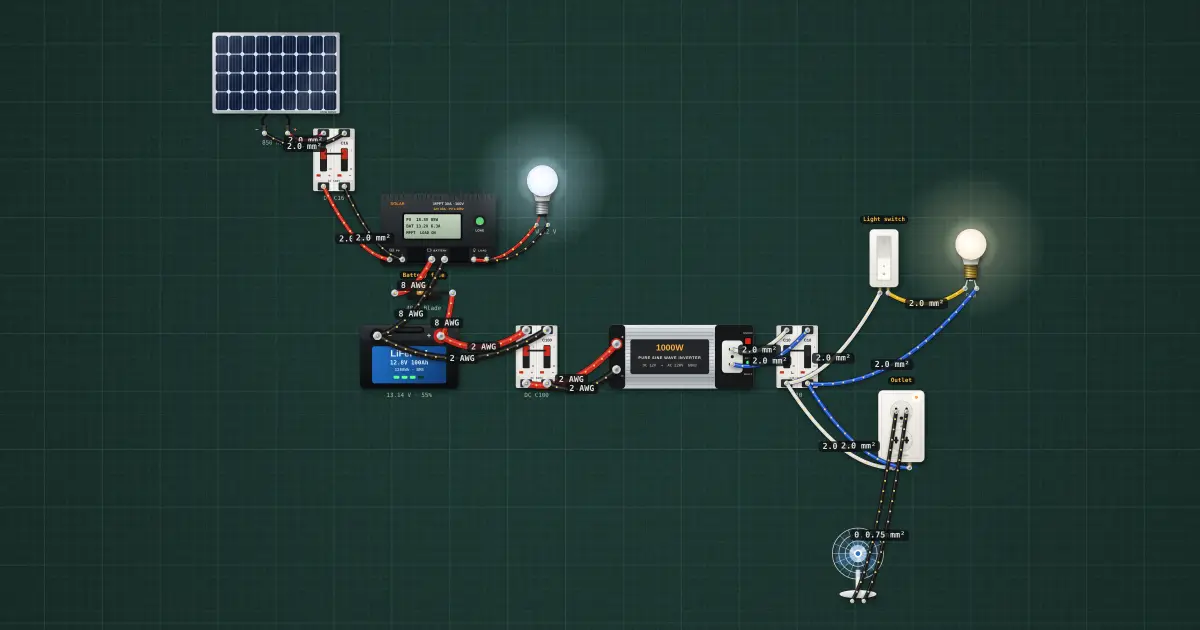
Open this lesson in the labFree, in your browser, no account needed.
How it works
The installation sequence
Follow the drawings and the manufacturers' manuals. A common, safe order is:
- Mounting structure. Fix the brackets and rails, square and level, into the roof framing.
- Modules. Clamp the modules to the rails.
- DC wiring, left open. Wire the modules into strings and run the cables to the equipment, with the PV breaker or disconnect open and the cable ends covered. The array is live as soon as it sees light.
- Controller. Mount it and wire its terminals, but do not close any breaker yet.
- Battery, connected last and with care. Place it, connect the inter-battery links, fit the battery fuse or breaker, and then connect to the controller.
- Inverter. Connect it to the battery bus through its own fuse or breaker.
- Loads. Wire the AC and DC load circuits, then switch on one at a time.
Most charge controllers must see the battery before they see the PV array: the controller uses the battery voltage to set itself up (for example, to detect 12 V or 24 V), and the array's open-circuit voltage alone can confuse or damage it. So the usual order is:
- To connect: battery first, then PV, then load.
- To disconnect: the reverse: load off, PV off, then battery.
Check your controller's manual. A few controllers ask for a different order, and the manual is the rule for that model.
Mounting and fastening
- Set brackets at the spacing the mounting system's instructions give for the module size and wind exposure, and fix them into purlins or rafters, not the roof sheet alone.
- Seal every roof penetration: the right flashing or rubber washer for the roof type and a sealant suitable for outdoor use. A leak caused by the installer is a common complaint.
- Use end clamps and mid clamps in the positions the module manual allows (clamping in the wrong zone can crack the glass or void the warranty).
- Tighten bolts and clamps to the stated torque with a torque tool. Under-tight parts loosen in wind; over-tight ones crack frames or strip threads.
- Avoid mixing metals that corrode together (for example, bare steel against aluminium) unless the system provides isolating washers.
Module wiring
- Connect modules in series and parallel exactly as the design shows. The string voltage and current set the rest of the system.
- Check polarity before connecting anything to the controller: measure each string's voltage with the meter, confirm positive and negative, and compare with what the design predicts for that many modules.
- PV connectors must be the same type and fully mated, with a click. Use the correct crimp tool and contacts; a poorly crimped or mismatched connector heats up and is a common cause of PV fires.
- Use PV cable or other UV-resistant cable rated for the voltage and temperature. Support it with UV-resistant ties or clips so it does not rest on the roof, rub on sharp edges or hang loose in the wind.
- Leave a drip loop where a cable enters a box or building, so water runs off the low point rather than following the cable inside.
Protective devices
The design gives the ratings; the OCPD lesson explains how they are worked out. On a typical small stand-alone system you will install:
- A DC breaker or fuse and disconnect between the array and the controller.
- A battery fuse or DC breaker, as close to the battery positive terminal as practical, rated for the battery's short-circuit current.
- A fuse or breaker for the inverter's DC input and for any DC load circuit.
- A low-voltage disconnect for the loads: often the controller's load output, or a separate device for loads too large for it.
- AC breakers on the inverter output and the load circuits.
Every DC device must carry a DC rating at or above the system voltage. An AC-only breaker may not stop a DC arc.
Grounding
Bond the module frames and the mounting rails together and to the equipment grounding conductor, using the methods the mounting system allows (grounding lugs or clips). Ground the equipment enclosures and connect the system to the grounding electrode as the design and PEC Article 2.50 (NEC 250) require. The grounding and surge protection lesson covers the details.
Wiring methods
- Non-metallic conduit (PVC), sunlight-resistant where exposed, for cable runs outdoors and through walls.
- Sheathed cable where the code allows it, clipped and protected from damage.
- Surface raceway inside buildings for neat runs along walls.
Keep DC and AC circuits separate or clearly marked, follow bend limits, and fill conduit no more than the code allows.
Terminating and splicing
- Strip only the length the terminal needs; no bare copper showing beyond the terminal, no cut strands.
- Use crimped ferrules on fine-stranded cable in screw terminals, and crimped lugs of the right size on battery and inverter cables.
- Tighten every terminal to the manufacturer's torque. A loose battery lug is a heat source at high current.
- Splice only in boxes, with connectors rated for the cable and the location. Do not splice PV cable with tape.
Labels
Label the PV and battery disconnects, the DC and AC breakers, the polarity of DC conductors, the warning that the array side stays live in daylight, the battery type and voltage, and the shutdown procedure. Labels must be durable and readable for the life of the system.
Notifying completion
When the installation is done, clean up the site, check every connection once more, and tell your supervisor or the client that the system is ready for commissioning. Hand over the record of what was installed, with any changes from the design marked on the drawings.
On the job
- Structure into the framing, penetrations sealed, torque applied.
- Strings wired per design; polarity and voltage checked before connecting.
- Connectors matched, crimped, fully mated; cable supported, drip loops made.
- DC-rated protection fitted; battery fuse close to the battery.
- Frames bonded and grounded; conduit and raceway neat.
- Battery first, then PV; labels on; completion reported.
Try it on the bench
- Open every breaker and the battery fuse, then close them in the safe order: battery fuse, battery breaker, PV breaker, then the AC breaker for the loads. Watch the controller come up.
- Run the 🛡 Safety check, then click a wire and make it smaller, or remove the battery fuse, and run it again to see what it flags.
- Switch on the 220 V bulb and the fan one at a time and read the inverter’s DC input current with the clamp meter.
Parts on the bench
- Solar panel
- 2 × DC breaker
- Solar charge controller
- LiFePO4 battery
- Power inverter
- AC breaker
- 12 V DC LED bulb
- 220 V bulb
- 220 V desk fan
- Wall switch
- Wall outlet
- Fuse
In the course
PV Systems Installation (NC II-aligned), module “6 · Installing the system”.