Materials, tools, manuals and PV drawings
Turn a PV design into a checked list of materials, prepare the right tools and instruments, and read manufacturer manuals and PV drawings. Most installation mistakes start with a wrong part or a misread drawing, long before anyone climbs the roof.
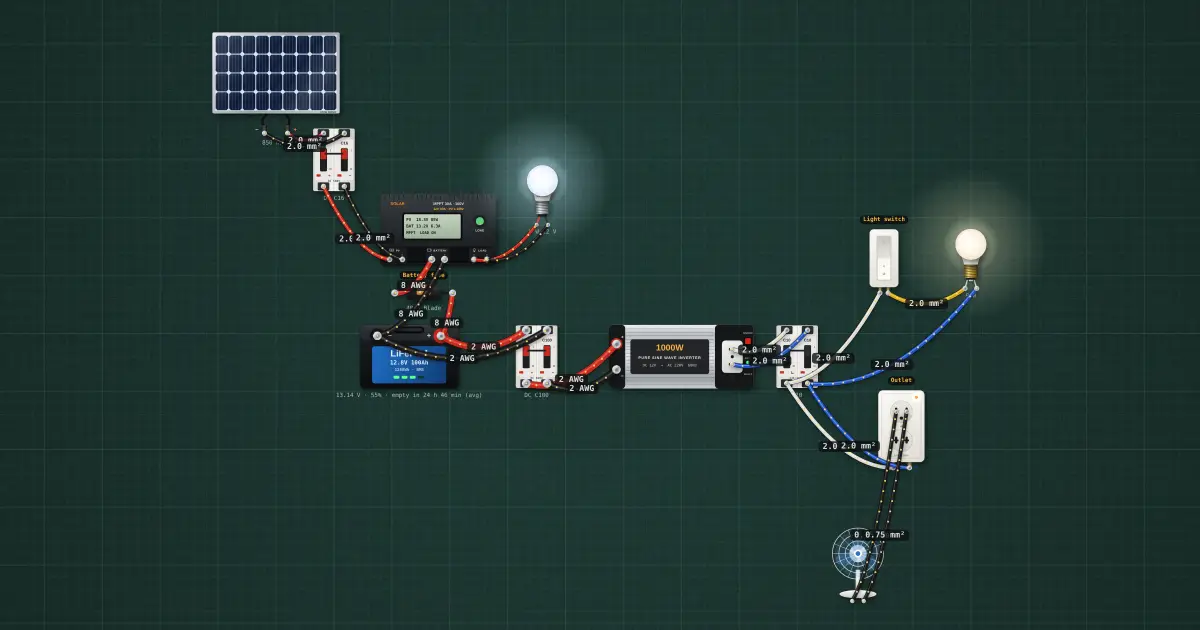
Open this lesson in the labFree, in your browser, no account needed.
How it works
The bill of materials
The design (the drawings, the specifications and the load and sizing calculations) tells you what to build. The bill of materials (BOM) turns that into a shopping list: every item, its exact specification and its quantity. Work through the system from the array to the loads so nothing is missed.
| Part of the system | Typical BOM lines |
|---|---|
| Array | Modules (watts, Voc, Isc), mounting rails, clamps, roof brackets or feet, bolts, sealant, PV connectors |
| DC wiring | PV cable (size in mm², UV-rated), battery cable, conduit, fittings, cable ties, lugs, ferrules |
| Protection | DC breakers or fuses and holders, disconnects, surge protective device, grounding conductor, ground rod, clamps |
| Power equipment | Charge controller, battery, inverter, enclosure or rack |
| AC side and loads | AC breaker, wire, boxes, switches, outlets, lamps |
| Finishing | Labels, warning signs, as-built drawing, manuals for the owner |
Add a reasonable allowance for cable, ties and small fittings, and note which items need a particular rating (a DC breaker is not the same as an AC breaker of the same amperes).
Requisition and checking deliveries
A requisition is the formal request for materials, usually on your company's form, with item, specification, quantity and the job it is for. When materials arrive, check them against the requisition and the delivery receipt before you sign.
- Quantity: count everything, including small parts like clamps and connectors.
- Specification: read the label or nameplate. A 12 V controller is not a 24 V one; a 20 A AC breaker will not do for a DC circuit; cable must be the size ordered.
- Damage: look for cracked module glass, bent frames, dented or swollen batteries, crushed boxes, loose parts rattling inside equipment.
- Documents: manuals, warranty cards and datasheets should come with the equipment. Keep them.
Write down any shortage or damage on the receipt and report it at once. Once you have signed for it, the problem is yours.
Storing materials
Store modules flat or on edge as the manufacturer allows, in their packing, on a level surface, never with weight stacked on the glass. Keep electronics dry and shaded. Store batteries upright, away from heat and children, with terminals covered; lithium batteries at the state of charge the manufacturer recommends for storage. Keep the site locked: modules, cable and batteries are attractive to thieves.
The installer's tool and instrument kit
| Tool or instrument | Used for |
|---|---|
| Digital multimeter (DC rating above the array voltage) | Voltages, polarity, continuity |
| Clamp meter that reads DC | Array, battery and load currents without opening the circuit. Many cheap clamps read AC only. |
| Insulation resistance tester | Checking cable insulation before energising. Disconnect electronics first; the test voltage can damage them. |
| Compass | Module orientation (allow for the difference between magnetic and true north, and keep it away from steel) |
| Inclinometer or angle finder | Roof pitch and module tilt |
| Measuring tape | Roof dimensions, rail spacing, cable runs |
| PV connector crimper and spanners | Crimping and tightening MC4-type connectors with the matching tool |
| Torque screwdriver or wrench | Terminals and clamps tightened to the manufacturer's values |
| Wire stripper, cable cutter, lug crimper | Preparing conductors |
| Drill, bits, sealant gun, level | Mounting structure and roof penetrations |
Check that each meter's leads, fuses and battery are good and that its category and voltage rating suit the job. A meter used beyond its rating is a hazard.
Reading manufacturer manuals
The manual is part of the specification. Many installation rules (torque, cable size, connection order, settings) are set by the manufacturer, and an installation that ignores them can void the warranty.
- Check the version. The manual must match the model and, for controllers and inverters, often the firmware. A manual downloaded for a similar model may be wrong.
- Read the installation section first: mounting position and clearances, ventilation, cable sizes and terminal torque, the order to connect and disconnect, grounding.
- Read the settings tables: battery type, charge voltages, low-voltage disconnect, inverter output settings. Write down the values you will set and compare them with the battery's datasheet.
- Read the warnings and the fault code list. You will need the fault list at commissioning and the owner will need it later.
Reading the PV single-line diagram
A single-line diagram (SLD) shows the system as one line per circuit, even where there are two or more conductors. Symbols vary between drafters, so always read the legend. In words, you will usually find:
- Module: a rectangle with a diagonal line or small cell pattern, often with the rating beside it.
- String: several modules joined end to end (series), drawn as a row of module symbols, labelled with the number of modules.
- Combiner: a box where strings join in parallel, usually with a fuse on each string.
- Fuse: a small rectangle in the line, or a line with an S-curve, labelled with its rating.
- Breaker or disconnect: a switch symbol (a line lifted at an angle), labelled DC or AC and with its rating.
- Charge controller, inverter: boxes labelled with their names and ratings; the inverter often shows a DC wave on one side and an AC wave on the other.
- Battery: long and short parallel lines (long is positive), labelled with voltage and capacity.
- Ground: a set of three shrinking horizontal lines at the end of a line.
Wire sizes, conductor counts and conduit sizes are written along the lines, often as a note number pointing to a table.
Layout drawings, notes and specifications
The layout (or plan) drawing shows where things physically go: the array on the roof with its dimensions and orientation, the rail and bracket positions, the equipment location, and the cable route. Read the scale and the north arrow. The notes and specifications tell you what the drawing does not show: cable types, the code to follow (PEC Article 6.90, the equivalent of NEC 690), torque values, labelling. When the drawing and the site disagree, do not guess: record it and ask.
On the job
- BOM worked from the design, array to loads, with ratings, not just names.
- Deliveries counted, specs read, damage noted before signing.
- Materials stored dry, flat, secure; batteries covered.
- Meters checked; clamp meter reads DC; torque tool ready.
- Manuals matched to the model; settings written down.
- SLD legend read; layout scale and north arrow checked.
Try it on the bench
- Open Tools → Bill of materials: compare its list with the parts on the solar bench and note the rating each line needs.
- Click each part on the bench (panel, controller, battery, inverter) and read its ratings in the inspector, as you would read a nameplate on delivery.
- Trace the bench from panel to load and name each item as it would appear on a single-line diagram: module, DC breaker, controller, fuse, battery, inverter, AC breaker, loads.
Parts on the bench
- Solar panel
- 2 × DC breaker
- Solar charge controller
- LiFePO4 battery
- Power inverter
- AC breaker
- 12 V DC LED bulb
- 220 V bulb
- 220 V desk fan
- Wall switch
- Wall outlet
- Fuse
In the course
PV Systems Installation (NC II-aligned), module “2 · Materials, tools, manuals and drawings”.